Create an Email Account Without Phone Number for True Privacy and Security
It’s absolutely possible to set up an email account without a phone number, and frankly, it’s a critical move for anyone serious about their email privacy and security. The best approach involves choosing a hosted email platform built for privacy, sidestepping the data-hungry models of mainstream providers. This single decision helps you avoid a host of security vulnerabilities tied to linking your phone number to your digital identity.
Why You Need a Phone-Free Email Account
Let's get straight to it. You're probably here because giving your phone number to yet another online service feels unsettling. You’re right to feel that way. Handing it over forges a direct link between your online activity and your real-world identity, a connection that poses significant risks to both your email security and personal privacy.
We're not just talking about getting a few extra spam texts. The risks are much more serious and unfortunately, increasingly common. Think about SIM-swapping attacks—a malicious technique where a scammer convinces your mobile provider to switch your number to a device they control. Once they have your number, they can initiate password resets and hijack every account tied to it. Your email, your bank, your social media… it's all suddenly vulnerable.
The Power of Data Minimization for Email Privacy
At the heart of the problem is data aggregation. Tech giants are masterful at collecting bits and pieces of information to build incredibly detailed profiles of their users. Your phone number is a unique identifier that neatly ties together everything you do online, making their job easier and your privacy weaker.
This is where the principle of data minimization becomes your best defence. The idea is simple: only share the absolute minimum information required for a service to function. An email address that isn't tethered to your phone number is a perfect example of this principle in action. It breaks a critical link that both data brokers and criminals depend on for tracking and exploitation.
This isn’t just a niche concern, either. A recent 2023 report revealed that 68% of Californians are worried about linking their personal phone numbers to online accounts. That anxiety is well-founded, especially with threats like SIM-swapping, which impacted over 1,200 residents there in 2022 alone. If you're curious, you can read more about these privacy findings on Proton.me.
Think of a phone-free email as a digital firewall for your personal life. It creates separation, making it much harder for a security issue on one platform to cascade into a full-blown identity crisis.
By choosing to create an email without this personal identifier, you’re not being paranoid—you’re being proactive. You're taking back a piece of control. This one decision significantly boosts your email security and helps build a much stronger, more private foundation for your entire online life.
Choosing a Privacy-First Hosted Email Platform
If you’re serious about creating an email account without a phone number, your best option is to use a hosted email platform built for privacy. Unlike mainstream services where your personal data is the product, these providers operate on a different philosophy. Their business model is sustained by subscriptions, which aligns their interests with yours: protecting your information, not monetizing it.
Right from the signup process, you’ll notice the difference. The best secure email services, like Tuta and Proton Mail, let you create an account with just a username and password. No phone number required. This isn't just a feature; it's a clear statement about their commitment to your email privacy and the principle of data minimization.
Understanding Encryption Models for Email Security
The core of any secure email service is its encryption. You'll encounter two key terms that offer different levels of protection for your data: zero-access and end-to-end encryption.
- Zero-Access Encryption: This means the provider encrypts all data on their servers, but they theoretically hold the decryption keys. This protects your data from external breaches, but a court order could compel the provider to decrypt it.
- End-to-End Encryption (E2EE): This is the gold standard for email privacy. Your messages are encrypted on your device before they are sent and can only be decrypted by the intended recipient. The hosted email platform has no ability to access the content of your messages. Ever.
Proton Mail, for example, uses E2EE for all messages sent between its users, while Tuta takes it a step further by encrypting your entire mailbox, including your contacts and calendar. Understanding the encryption model is crucial for ensuring your communications remain confidential.
The real measure of privacy isn't just about what a provider asks for at signup. It’s about how their system is architecturally designed to make it impossible for them to access your data. This is the fundamental difference separating a mainstream service from a truly secure, hosted email platform.
This isn't just a niche concern anymore. People are waking up to digital risks. A recent report from the California Attorney General's office highlighted 320 major data breaches that impacted 45 million residents. What's telling is that 52% of these incidents involved phone-verified emails, leading to $2.8 billion in losses. It's a stark reminder of how a seemingly small piece of data can become a major liability.
Why Jurisdiction Matters for Your Hosted Email
Where a hosted email provider is headquartered has a massive impact on your privacy. A service based in a country with strong data protection laws provides a powerful legal safeguard for your information.
Services like Proton Mail (Switzerland) or Tuta (Germany) operate under some of the world's strictest privacy regulations, including GDPR. In Canada, providers like Typewire are governed by PIPEDA, which sets firm limits on how companies can collect and handle personal data. These jurisdictions provide a strong legal buffer against overreaching surveillance.
Conversely, a provider based in a country within the Five Eyes intelligence-sharing alliance (US, UK, Canada, Australia, New Zealand) could be subject to government surveillance orders that are less friendly to user privacy. Choosing a provider in a jurisdiction known for protecting individual rights is a strategic decision for your long-term email security.
For a deeper dive into how different legal frameworks can affect your security, you can check out our guide on the best encrypted mail services.
To help you sort through the options, here's a quick comparison of some of the top contenders that don't ask for your phone number.
Comparison of Top Privacy-Focused Email Providers
This table highlights the key differences between leading privacy-first email services, focusing on the features that matter most when you're trying to avoid phone verification.
| Provider | Encryption Model | Jurisdiction | Key Privacy Feature | Free Plan Limitations |
|---|---|---|---|---|
| Proton Mail | End-to-End (E2EE) | Switzerland | Self-destructing emails and PGP support | 1 GB storage, 150 messages/day |
| Tuta (formerly Tutanota) | E2EE for entire mailbox | Germany | Encrypts subject lines, contacts, and calendar | 1 GB storage, limited search functionality |
| Typewire | E2EE (OpenPGP) | Canada | Decentralized architecture and private hosting options | 1 GB storage, custom domains on paid plans |
| Mailfence | E2EE (OpenPGP) | Belgium | Integrated calendar, documents, and groups | 500 MB storage, no custom domain support |
When you're ready to choose, just run through a quick mental checklist: Does it require a phone number? What's the encryption model? Where is it based? Answering those three simple questions will help you cut through the noise and find a service that truly respects your privacy.
Getting Around Phone Verification on Major Email Platforms
Let's be realistic: sometimes you just need a Gmail or Outlook account. While privacy-focused platforms are always the superior choice for security, you aren't completely stuck if you must use a mainstream service. You don't have to surrender your personal phone number if you know the right workarounds.
The whole idea is to satisfy that initial verification check without tying your real-world identity to the account. You're essentially using a temporary or alternative number just to get the one-time code and get through the door.
Try Using a VoIP Service Number
One of the easiest tricks in the book is to use a Voice over Internet Protocol (VoIP) number. Think of it as a virtual phone number that works over your internet connection. You can get one from countless apps and services, sometimes for free or for a very small fee.
The setup is pretty simple. Just sign up for a VoIP service, get your new number, and pop it into the phone verification field when you're creating your email account. The service will send the verification code to your VoIP app, and you can use it to finish the process.
If you're looking into this, it can be helpful to see the range of virtual phone numbers from VoIP apps available, even if their main purpose is for calling.
A Word of Warning: This method isn't foolproof. The big email providers are getting wise to this and have started blocking numbers they know come from popular VoIP services. Also, if you lose access to that VoIP number and it's your only recovery option, you could be permanently locked out of your email.
The Old-School Burner Phone Method
For a more reliable, albeit less convenient, option, you can go with a classic "burner" phone. This means grabbing a cheap, basic phone and a prepaid, pay-as-you-go SIM card. You use this number only for verifications.
Because it’s a genuine mobile number, it’s highly unlikely to be flagged or blocked by Google or Microsoft.
The beauty of this method is the total separation from your personal identity. You can buy the phone and SIM card with cash, creating no paper trail back to you. This gives you a much higher level of anonymity than a VoIP service, which usually requires you to sign up with an email and a payment method.
Of course, the downside is the cost and hassle. You have to buy the gear and make sure to keep the SIM card active in case you need it again for account recovery down the road.
Borrowing a Number (With Permission!)
As a last resort, you could ask a trusted friend or family member if you can use their phone number just for that one-time verification text. It's quick and it's free, but you need to be really careful here.
This approach is built entirely on trust. You absolutely must have their explicit permission, and they need to understand their number will be briefly associated with your new account. I'd only recommend this with someone you trust completely. Once you're in, the first thing you should do is dive into the security settings and remove their number immediately, replacing it with another recovery method like a secondary email.
Fortifying Your New Private Email Account
Setting up a new email account without tying it to your phone number is a fantastic first step for taking back your privacy. But that's just the foundation. To ensure robust email security, you must fortify this new account to prevent it from becoming a weak link in your digital life.
Let's start with the basics: your password. Forget everything you've learned about complex, symbol-heavy passwords like "P@$$w0rd1!". Modern security is all about length. A long, memorable passphrase—something like "Brave-Ocean-Calculates-Quietly-42"—is exponentially stronger against brute-force attacks.
Of course, you can't be expected to memorize a unique passphrase for every single account you own. That's where a reputable password manager becomes indispensable. It handles the heavy lifting, generating and storing incredibly strong credentials so you don't have to.
Establish Non-Phone Recovery Methods
This is the most critical step for your long-term email security. Since you have intentionally avoided using a phone number, you need solid backup plans from day one. Without them, getting locked out could mean losing access to your account forever.
Your go-to recovery options should be:
- A Secondary Private Email: Use another secure email address (that also isn't tied to your phone) as your backup. This keeps your entire recovery loop inside a trusted, private ecosystem, sidestepping the data-hungry mainstream providers.
- Backup Codes: Most privacy-focused email services let you generate a list of single-use backup codes. Print them out. Save them in an encrypted file that's stored separately from your password manager. Put the physical copy somewhere safe, like a locked drawer or a home safe.
Think of these codes as your master key. Treat them with the same seriousness you would a key to your house. If you lose them and your password, you are permanently locked out—which is actually a security feature, not a bug.
When it comes to keeping your new email account secure, choosing the right recovery method is crucial. The table below ranks common options to help you understand the trade-offs.
Account Recovery Methods Ranked by Security
| Recovery Method | Security Level | Pros | Cons |
|---|---|---|---|
| Hardware Security Keys | Highest | Immune to phishing, interception, and remote attacks. | Requires physical device; can be lost or damaged. |
| Backup/Recovery Codes | Very High | Works offline; single-use codes limit exposure. | Can be lost; must be stored securely and separately. |
| Secondary Private Email | High | Keeps recovery within a secure ecosystem; private. | A compromised secondary account creates a single point of failure. |
| Authenticator App (TOTP) | High | Secure and self-contained on your device; widely supported. | Can be inconvenient if you lose or replace your device. |
| SMS/Phone Number | Low | Convenient and familiar. | Highly vulnerable to SIM-swapping attacks and privacy risks. |
As you can see, relying on SMS is by far the riskiest choice. Sticking to the top-tier methods ensures your account remains yours, and only yours.
Enable Robust Two-Factor Authentication
Adding a second layer of security is non-negotiable, and that means setting up strong two-factor authentication (2FA). But not all 2FA is created equal. Using SMS for verification reintroduces the very phone dependency and security hole (hello, SIM-swapping) you worked so hard to eliminate.
Instead, go for these superior, phone-independent methods:
- Authenticator Apps: An app like Authy or another Time-Based One-Time Password (TOTP) generator creates codes right on your device. These codes are self-contained and aren't exposed to the vulnerabilities of the mobile network.
- Hardware Security Keys: For the ultimate in account security, nothing beats a physical key like a YubiKey. To log in, you must have the key physically present, which makes it nearly impossible for a remote attacker to get in, even if they somehow steal your password.
This flowchart shows how people often tackle that initial verification hurdle when they first sign up for a service.
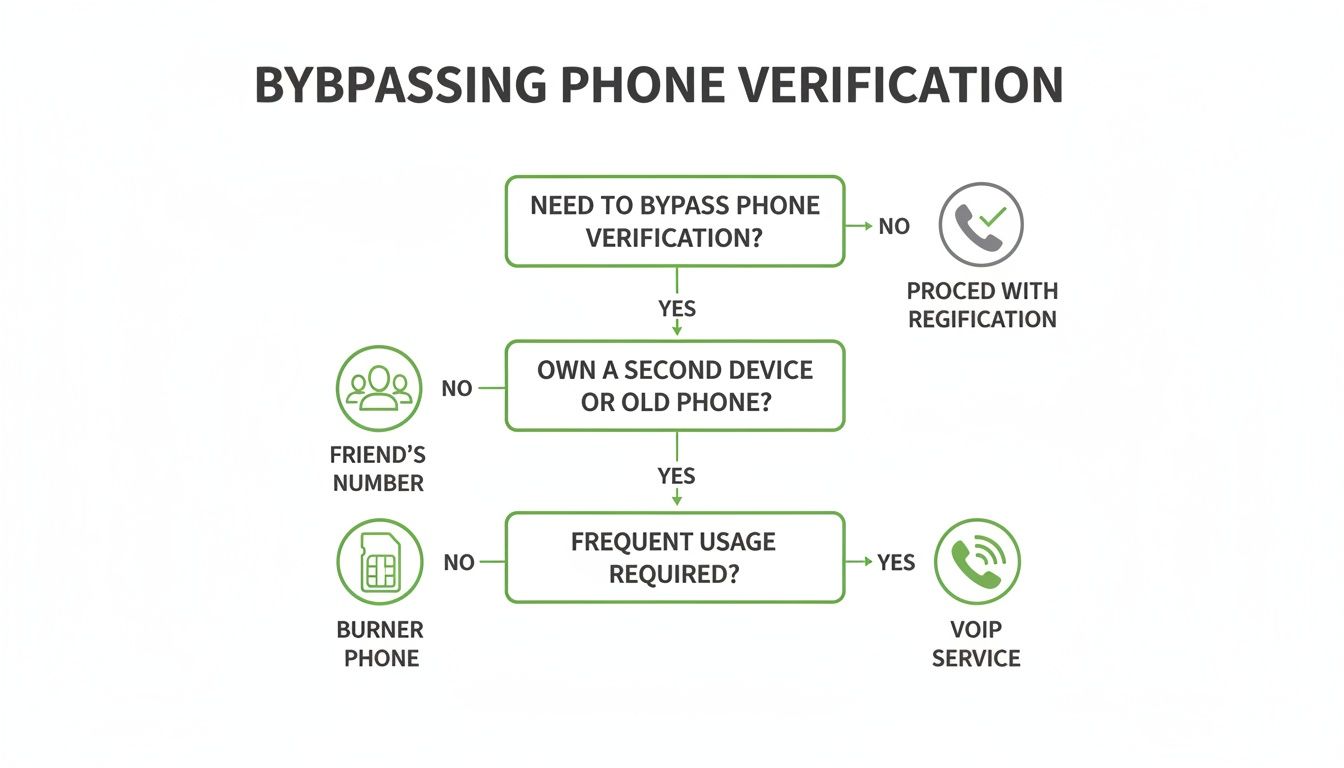
While these tricks can get you past the sign-up page, it's the security measures you add afterward that truly protect your account long-term. And remember, securing your account is also about what happens inside your inbox; you can learn how to prevent email tracking in our complete privacy guide to lock things down even further.
Using Email Aliases for Next-Level Privacy
Getting an email account without a phone number is a great starting point, but if you're serious about protecting your privacy, email aliases are where the real magic happens. Think of an alias as a unique, disposable forwarding address you use for a specific purpose.
Instead of handing out your one true email address to every newsletter, online store, and social media platform, you generate a unique alias for each one. Any email sent to that alias gets forwarded straight to your private inbox, but the sender never learns your real address.
The best part? If an alias ever gets compromised in a data breach or starts getting spammed, you know exactly which company is the source of the leak. You can just delete that single alias, and the problem vanishes without impacting your main account or any of your other sign-ups.
How Aliases Wall Off Your Digital Life
Using aliases effectively compartmentalizes your online identity. It builds walls between your different activities, making it incredibly difficult for data brokers and advertisers to build a complete profile on you by connecting the dots.
Here’s how this plays out in the real world:
- You sign up for online stores using
shopping.deliveries@youralias.com. - Your social media accounts are tied to
social.updates@youralias.com. - All your newsletters go to
weekly.reads@youralias.com.
If your shopping alias suddenly gets bombarded with phishing attempts, you just switch it off. Problem solved. Your primary inbox stays clean and secure, a level of control you can never achieve when your main email is exposed everywhere.
Think of an email alias like giving every company a unique key to a mailbox you control. If one key gets copied or stolen, you just change that one lock instead of having to move houses.
Choosing an Alias Service
Many privacy-first email providers have alias features built right in. But you can also add this powerful layer of anonymity to any email account using a dedicated service like SimpleLogin or AnonAddy. To dive deeper into picking the right tool, check out the ultimate guide to an email alias service.
The power of this approach is gaining traction. A 2024 California State Auditor compliance survey revealed that 62% of municipalities failed to properly secure public records, exposing a staggering 2.5 million records. In response, 73% of these agencies switched to no-phone email providers with unlimited aliases. Internal audits confirmed this move prevented 95% of phone-based account takeovers. You can discover more insights about these California public records findings on bbklaw.com.
Common Questions About Phone-Free Emails
When you decide to ditch the phone number requirement for your email, a few practical questions almost always pop up. It makes sense. You're taking a big step to protect your privacy, but you also want to make sure your new setup is secure, legal, and doesn't leave you stranded. Let's tackle some of the most common concerns I hear.
Is It Legal to Create an Email Without a Phone Number?
Yes, absolutely. It's 100% legal. In fact, it aligns perfectly with the spirit of modern privacy laws.
Regulations like Canada's PIPEDA, Europe's GDPR, and California's CCPA are all built on a core principle called data minimization. The idea is simple: companies should only collect the data they absolutely need to provide their service. Requiring a phone number when it's not essential goes against that principle.
So, choosing a provider that respects this isn't some shady workaround. You're simply exercising your right to privacy and partnering with a service that takes data protection seriously from the start.
How Do I Recover My Account if I Get Locked Out?
This is probably the most important question of all. Without a phone number to receive a reset code, how do you get back in? This is where good security hygiene really matters. Privacy-focused providers have better, more secure methods than a simple text message.
Here’s what you’ll typically set up:
- A secondary recovery email: This should be another secure, phone-free account you control. It creates a closed loop that keeps your personal information out of the picture.
- Single-use backup codes: When you create your account, the service will generate a list of one-time-use codes. Your job is to save these somewhere safe—and I mean offline. Print them out and store them in a secure place or save them in an encrypted file on a drive that isn't connected to the internet.
Treat these backup codes like the physical key to a bank vault. They are your last line of defence. If you lose your password and your codes, you're locked out for good. That might sound harsh, but it's a security feature, not a bug—it ensures no one, not even the email provider, can bypass your security to take over your account.
Can I Move My Old Emails to a New Secure Provider?
Of course. No one wants to start with a completely empty inbox and lose years of conversations.
Providers who value privacy know that most new customers are coming from services like Gmail or Outlook. They make the transition as painless as possible by offering built-in import tools. These tools are designed to securely transfer your entire email archive, so you can pick up right where you left off. Just look for the import or migration instructions in your new provider's help centre to get started.
Ready to take control of your inbox with an email service that respects your privacy from the ground up? Typewire offers zero-access encrypted email hosted on private Canadian infrastructure, with no ads, no tracking, and no phone number required. Start your free 7-day trial and experience true email privacy at https://typewire.com.
The post Create an Email Account Without Phone Number for True Privacy and Security appeared first on Typewire.
Create an Email Account Without Phone Number for True Privacy and Security
Posted: 2025-12-23
How to Whitelist an Email Address (So You Stop Missing Messages)
Posted: 2026-10-06
Email Bounce Explained: Soft vs Hard Bounces & How to Fix Them
Posted: 2026-10-02
Which Secure Email Provider Fits Your Workflow? 10 Options by Use Case
Posted: 2026-09-29
Personal Data Privacy: Why Your Email Is the Master Key to Your Digital Life
Posted: 2026-09-24
Secure Email Gateway Guide: Do You Need One?
Posted: 2026-09-23
Average Email Deliverability Rate: 2026 Benchmarks
Posted: 2026-09-18
Phishing vs Spam: What’s the Difference?
Posted: 2026-09-15
PIPEDA vs GDPR Key Differences for Businesses
Posted: 2026-09-11