How to Send an Encrypted Email and Protect Your Digital Privacy
Sending an encrypted email means your message gets scrambled into an unreadable code that only your intended recipient can decipher. The most straightforward way to achieve this is by using a hosted email platform like Typewire, which handles all the security for you. Alternatively, for those who need manual control, you can configure technologies like PGP or S/MIME in a desktop email client.
Why Email Encryption Is Essential for Modern Email Security
Think of a standard email like a postcard. Anyone who handles it on its journey—from your server to your recipient's—can glance at its contents. In an age of relentless data breaches, sophisticated phishing scams, and widespread surveillance, leaving your digital mail exposed is a gamble you can't afford to take. This applies equally to individuals protecting personal chats and businesses guarding sensitive company information.
Basic email security just doesn't cut it anymore. True email privacy requires encryption. It effectively transforms your readable message into a complex jumble of code, making it completely useless to prying eyes. It’s the digital equivalent of putting your postcard inside a locked, tamper-proof safe.
The Real-World Risks of Unsecured Email
The threats lurking in our inboxes are persistent and getting smarter all the time. For a business, a single unsecured email could trigger devastating financial losses, tarnish a hard-won reputation, or lead to serious legal penalties. For an individual, the consequences can be just as dire, from identity theft to the exposure of private health or financial records.
The situation in Canada is particularly acute. Cyber threats are everywhere, and phishing remains one of the most common ways attackers breach email security. A recent report revealed that 32.3% of security incidents at Canadian organizations started with credentials stolen through phishing attacks. That makes it the number one cause of breaches.
Looking ahead, the same report predicts that business email compromise (BEC) attacks—things like faked invoices—are expected to climb for 56.3% of organizations in 2025. You can get all the details in the full State of Email Security 2025 report.
Moving Beyond Basic Protections
Many people assume their email is already safe, but standard protocols typically only protect a message while it's in transit. The moment it lands on a server, it can often be accessed by the provider, scanned for advertising keywords, or handed over to authorities. That’s why it’s so important to understand what makes an email truly secure.
True email security and privacy come from end-to-end encryption (E2EE). This ensures that only you and your recipient hold the keys to unlock the message content. Not even your email provider can read your communications.
This level of robust protection is absolutely essential for a few key reasons:
- Protecting Sensitive Data: It’s crucial for safeguarding things like trade secrets, financial records, client lists, and confidential legal discussions.
- Ensuring Personal Privacy: It keeps your conversations with family, doctors, or lawyers completely private, as they should be.
- Meeting Compliance Requirements: For many businesses, adhering to strict data protection laws is not just good practice—it's a legal requirement. To get a better grasp on the legal side, it's worth exploring the importance of GDPR compliance.
By learning how to send an encrypted email, you're taking a vital, proactive step toward securing your digital life. You’re making sure your private communications stay exactly that—private.
Choosing Your Path to Secure Email
Before you can send your first encrypted email, you need to pick a tool for the job. The right method really comes down to your own needs—are you a casual user who just wants more privacy, or a professional handling incredibly sensitive information? Your choice will define your approach to email security and privacy.
Think of it like choosing a lock for your front door. You could install a complex, high-security system yourself, buy a standard deadbolt from a trusted brand, or move into a secure building where the doorman handles everything. Each option keeps you safe, but the effort and expertise required are worlds apart.
The three main routes you can take are PGP, S/MIME, or a hosted email platform with built-in encryption.
PGP: The Gold Standard for Activists and Journalists
Pretty Good Privacy (PGP), and its free, open-source cousin GnuPG, is the original and most battle-tested method out there. It’s built on a system of public and private keys. Your public key is like your home address—you can give it to anyone who wants to send you a secure package. Your private key is the only key that opens your mailbox, and you need to guard it with your life.
When someone wants to email you securely, they use your public key to scramble the message. Once it’s scrambled, the only thing that can possibly make sense of it again is your matching private key. This whole setup is decentralized, operating on what’s called a "web of trust." You’re in complete control. No company or third party ever has access to your keys, which is exactly why it’s the go-to for journalists, activists, and anyone who needs absolute certainty their communications are locked down.
But all that control comes at a price: a pretty steep learning curve. You’re on the hook for generating your keys, managing them, and storing them safely. You also have to securely exchange public keys with your contacts before you can even start talking, which can feel clunky for anyone not technically inclined.
S/MIME: The Corporate Choice
Secure/Multipurpose Internet Mail Extensions, or S/MIME, is another long-standing option for encrypting and digitally signing emails. Where PGP has its decentralized web of trust, S/MIME leans on a centralized Certificate Authority (CA)—the same kind of system that secures websites with HTTPS.
With S/MIME, you get a digital certificate from a trusted CA that’s tied directly to your email address. This certificate holds your public key, while your private key stays safe on your device. Because it’s all managed by recognized authorities, S/MIME is often built right into corporate email clients like Microsoft Outlook and Apple Mail.
For businesses, S/MIME offers a more formal, centrally managed email security framework. It’s perfect for locking down communications within a company or with trusted partners, but it’s less practical for emailing individuals who aren’t part of that ecosystem and don't have their own S/MIME certificates.
Hosted Email Platforms: The Accessible Solution
Let’s be honest—for most of us, the hands-on complexity of PGP and the corporate slant of S/MIME are overkill. This is where hosted email platforms with built-in end-to-end encryption (E2EE) shine. Services like Typewire are designed to handle all the technical heavy lifting behind the scenes, making top-tier email privacy accessible to everyone.
With a secure hosted email platform, encryption just happens. You send an email to another person on the same platform, and the message gets encrypted on your device and can only be decrypted by the recipient. There are no keys to juggle or certificates to install. It simply works, making it incredibly easy to send an encrypted email without needing a computer science degree.
This ease of use has been a game-changer, especially as privacy laws get tougher. In Canada, the Personal Information Protection and Electronic Documents Act (PIPEDA) has been a major driver since it came on the scene back in 2000. Today, 65% of Canadian organizations rely on email encryption to protect personal data, a huge jump driven by regulations and the constant threat of cyberattacks. With North America expected to represent 34.24% of the global email encryption market in 2025, user-friendly solutions are more critical than ever. You can dig into the full email encryption market forecast report for more details.
So, which path is yours? It all comes down to your threat model and comfort level with technology. If you're a journalist who needs maximum independent control, PGP is your best bet. Working in a corporate environment? S/MIME is probably already your standard. But if you’re an individual or a business looking for powerful privacy without the headache, a hosted email platform is the clear winner.
Taking Control: Sending Encrypted Email Manually with PGP
For those who want absolute control over their digital privacy, going the manual route with Pretty Good Privacy (PGP) is the gold standard. This method puts you—and only you—in charge of your encryption keys. It takes a bit more effort to set up, but the payoff is a level of email security that’s completely independent of any service provider.
To get started, you just need two things: an email client that understands PGP and the GnuPG software, which is the free, open-source engine that makes PGP work. A fantastic combination for this is the Thunderbird email client, which now has OpenPGP functionality built right in, making the whole process much more straightforward than it used to be.
Generating Your First Key Pair
The entire foundation of PGP security rests on your public/private key pair. The easiest way to think about it is this: your public key is like a secure, publicly listed mailbox. Anyone can use it to send you a locked package. Your private key, on the other hand, is the only key in the world that can open that box. You need to guard it with your life.
When you first set up OpenPGP in Thunderbird, the software will walk you through creating this pair. You'll be asked for a few key details:
- Your Identity: This is simply your name and the email address you want to link the key to.
- Key Type and Strength: For modern security, you’ll want at least a 2048-bit RSA key. If you're thinking long-term, a 4096-bit key offers even more robust protection.
- Expiration Date: It's good practice to set an expiration date—say, a year or two out. You can always extend it later, and it helps ensure you're cycling your keys.
This diagram helps visualize how the PGP process we're discussing fits in with other encryption methods.
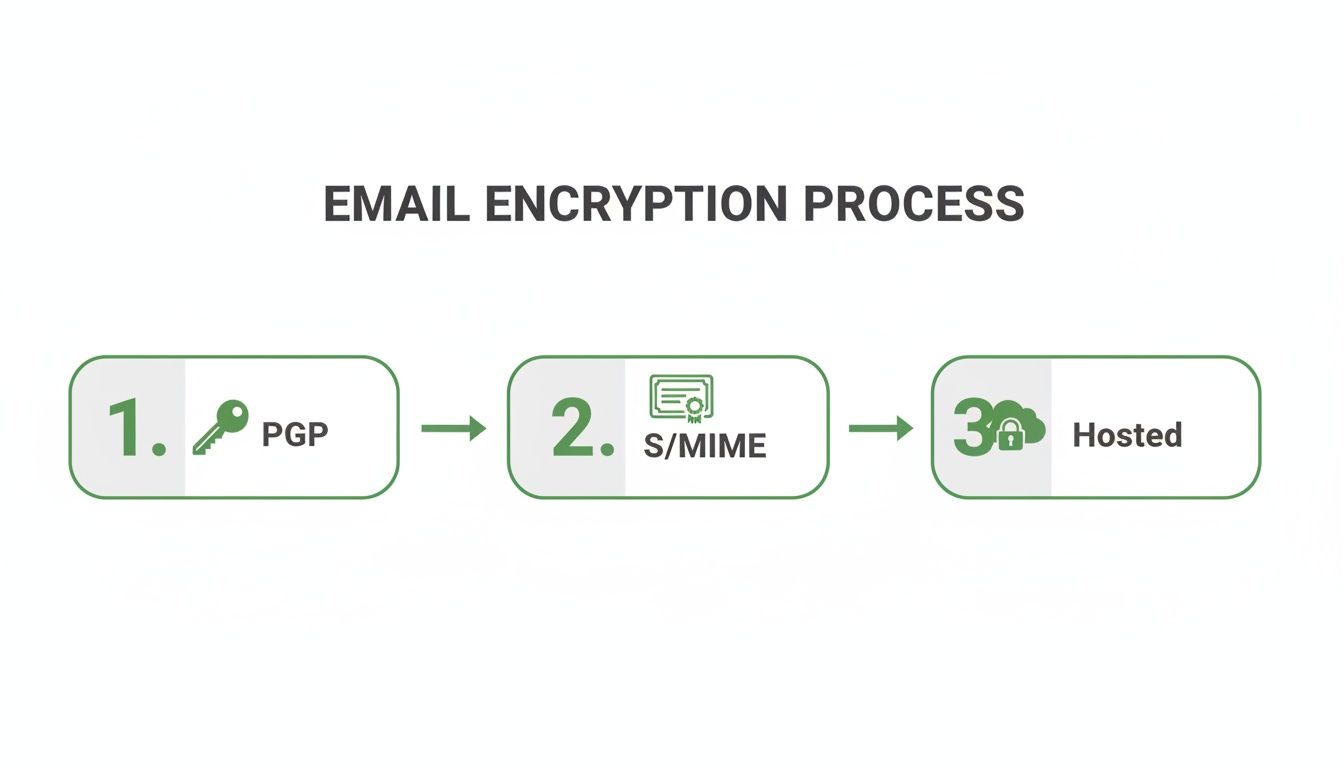
As you can see, PGP is all about a user-managed system, which is quite different from the certificate-based approach of S/MIME or the automated systems of hosted providers.
The Critical Role of Your Passphrase
During key generation, you’ll be prompted to create a passphrase. This is not just another password. It’s the final, crucial line of defence that encrypts your private key right there on your computer. If someone gained access to your device, this passphrase is the only thing stopping them from stealing your private key and either impersonating you or decrypting all your past messages.
A strong passphrase is your private key's bodyguard. It should be long, complex, and unique—something you can remember but that would be nearly impossible for anyone else to guess. Think of a full, memorable sentence rather than a single word with a few numbers swapped in.
Once you’ve set this up, your key pair is stored locally on your machine. Now you're ready for the most important part of the PGP dance: sharing your key so people can actually send you secure messages. For a deeper dive, check out our complete guide to PGP encryption online.
Exchanging Keys and Verifying Identity
Before you can send someone an encrypted email, you need their public key, and they need yours. This is the digital equivalent of swapping business cards. You can attach your public key to an email or, for wider access, upload it to a public keyserver where others can find it.
But just getting a key isn't enough. How do you really know the key you just received actually belongs to your friend and not an imposter? This is where fingerprint verification comes in. Every PGP key has a unique, shorter string of characters called a fingerprint that acts as its ID.
To be sure you're communicating with the right person, you have to verify this fingerprint through a separate, trusted channel.
- Real-World Scenario: Let's say you need to send sensitive project files to your colleague, David. He emails you his public key. To be safe, you call David on his direct line—a channel you already trust—and ask him to read you the last eight characters of his key's fingerprint. If what he says matches what you see on your screen, you can confidently sign his key, telling your system that it’s trusted.
This step is what prevents a "man-in-the-middle" attack, where a hacker could intercept your exchange and swap in their own public key. It might feel like an extra hoop to jump through, but it's the absolute cornerstone of PGP's "web of trust."
Composing and Decrypting Your First Message
Once you've exchanged and trusted each other's keys, sending an encrypted email in Thunderbird is surprisingly simple. When you compose a message to your contact, you’ll see an option to enable encryption. Click it, hit send, and Thunderbird automatically uses your recipient's public key to scramble the message into unreadable ciphertext.
When they reply, their email client will use your public key to do the same. When the message lands in your inbox, Thunderbird will see that it's encrypted and prompt you for your passphrase. Once you enter it, your private key is unlocked, and the message is instantly decrypted back into plain, readable text.
This manual approach gives you total sovereignty over your email security. It definitely demands more personal responsibility, but the result is a communication channel protected by powerful, time-tested cryptography that you control from end to end.
The Effortless Route: Using a Hosted Email Platform
While manually setting up PGP gives you ultimate control, it's not practical for everyone. The technical hurdles can be a real barrier to achieving better email privacy. What if you could get that same level of robust email security without ever touching a command line or worrying about key servers?
That's exactly what hosted encrypted email platforms offer. They provide a seamless, "always-on" approach to privacy that works right out of the box, shifting email security from a DIY project to a fully managed ecosystem.
How Automatic Encryption Changes Everything
With a hosted email platform like Typewire, the entire experience is refreshingly simple. When you send an email to another user on the same platform, end-to-end encryption (E2EE) is applied automatically. Your message gets encrypted on your device and can only be decrypted on your recipient's device.
This means you just compose your message and hit send. That’s it. No more manually exchanging public keys or verifying fingerprints over the phone. The complex cryptographic handshake happens completely behind the scenes, letting you focus on your conversation, not the technology protecting it.
This accessibility is driving a huge shift toward stronger privacy. In Canada alone, the email encryption market is set to explode, projected to jump from USD 3.41 billion in 2025 to USD 7.86 billion by 2031. That's a solid 14.7% compound annual growth rate, proving just how seriously businesses and individuals are taking secure communications. For privacy-conscious Canadians, using hosted email platforms like Typewire not only makes encryption straightforward but also ensures messages stay secure on Vancouver-hosted servers.
A Real-World Example with Typewire
Getting started and sending your first secure message is incredibly easy. The whole process is designed to feel familiar—just like any other modern email service, but with powerful security baked into its core.
Here’s a glimpse of the clean, focused interface you can expect.
The design puts clarity and ease of use first, so the security features never get in the way of a smooth workflow.
Once your account is set up, sending an encrypted message is no different from sending a regular one. Because encryption is automatic when you email other Typewire users, your sensitive discussions remain confidential without any extra effort. For businesses and individuals who need security without the headache, this is a massive advantage.
The real benefit here is peace of mind. You no longer have to second-guess yourself, wondering, "Did I remember to encrypt this?" A hosted email platform ensures your private conversations stay private by default—a crucial defence in today’s threat-filled environment.
PGP vs. Hosted Email Platforms: A Quick Comparison
Choosing between a manual PGP setup and an all-in-one hosted email platform like Typewire comes down to how much work you want to do versus how much you want automated. Both can be incredibly secure, but the day-to-day experience is worlds apart.
Here’s a breakdown to help you see the difference at a glance:
| Feature | PGP/GnuPG (Manual) | Typewire (Hosted Platform) |
|---|---|---|
| Setup & Configuration | Requires technical skill: command-line tools, key generation, and plugin installation. | Simple sign-up process. Ready to use in minutes with no technical setup. |
| Key Management | You are fully responsible for generating, storing, backing up, and revoking your own keys. | Handled automatically and securely by the platform. Zero user maintenance required. |
| Daily Use | Requires manually encrypting/signing emails. Can be complex on mobile devices. | Encryption is automatic and invisible when emailing other users on the platform. |
| Recipient Experience | Your recipient must also use PGP and have your public key. High friction for non-technical users. | Seamless for other platform users. Simple password-protected link for external recipients. |
| Cross-Device Sync | Can be difficult to sync private keys securely across multiple devices. | Natively syncs across web, desktop, and mobile apps without compromising security. |
While a manual PGP setup offers unparalleled control for those who need it, a hosted email platform delivers robust security that is accessible to everyone, right out of the box.
More Than Just Encryption: A Complete Privacy Ecosystem
Top-tier hosted email platforms offer a whole suite of features that protect you from multiple angles. It's not just about scrambling the contents of your messages; it's about building a fortress around your entire inbox to maximize your email privacy.
These extra layers create a much more comprehensive defence:
- Tracker and Spy Pixel Blocking: Ever wonder how marketers know you opened their email? They use tiny, invisible pixels. A secure service blocks these by default, preventing senders from monitoring your activity.
- Ad-Free Experience: Since the business model is built on subscriptions, not data mining, your inbox stays clean. Your conversations are never scanned to sell you things.
- Canadian Data Residency: For users in Canada, having your data stored exclusively on Canadian soil ensures it's governed by local privacy laws like PIPEDA, not foreign ones.
This holistic approach makes a hosted email platform one of the most effective ways to protect your communications. If you're weighing your options, our guide to true email privacy and security breaks down the differences in detail. As you do your research, it can also be helpful to compare alternatives to secure email providers like Skiff Mail.
By choosing a hosted platform, you're opting for an effortless yet powerful way to send an encrypted email. You get all the benefits of advanced cryptography without the steep learning curve, making real digital privacy something anyone can achieve.
Maintaining Your Digital Privacy Hygiene
Sending an encrypted email is a fantastic first step, but the technology is only half the equation. It's a bit like having a state-of-the-art security system at home. The cameras and alarms are great, but if you leave the front door unlocked or jot the alarm code on a sticky note by the keypad, you’ve undermined the whole system. The same principle applies here. Real email security and privacy come from building good habits—what I call digital privacy hygiene.

This is all about the little details that can make or break your security. It’s about creating a routine that protects your communications from beginning to end, so one simple mistake doesn't undo all the heavy lifting your encryption tools are doing for you.
Protect Your Private Key at All Costs
If you’ve gone the manual route with PGP, your private key is the absolute centre of your security universe. Think of it as the master key that not only decrypts your messages but also proves you are who you say you are. If that key falls into the wrong hands, an attacker can read everything you've ever received and can even start sending messages impersonating you.
Guarding this key is non-negotiable. Here's what you need to do:
- Use a Strong Passphrase: We touched on this before, but it's your first line of defence. It needs to be long, completely unique, and something only you could remember.
- Store It Securely: Don’t just leave your key sitting on your desktop. Keep it on an encrypted device. For an extra layer of protection, I strongly recommend storing it on an offline hardware device like a YubiKey or a Nitrokey.
- Create a Revocation Certificate: This is your emergency "kill switch." Generate one the moment you create your key pair and store it somewhere safe and completely separate from the key itself. If your key is ever lost or compromised, you publish this certificate to let the world know it can't be trusted anymore.
Treating your private key with this level of seriousness is the only way to ensure your digital identity stays yours and yours alone.
Don’t Forget About Metadata
So, you’ve encrypted the body of your email. That's great. But what about the subject line? Most standard PGP and S/MIME setups leave it completely unencrypted, and that can be a massive privacy leak.
Metadata, which includes the sender, recipient, and subject line, can reveal a surprising amount. A subject line like "Confidential Merger Discussion" or "Urgent Medical Results" tells an observer almost everything they need to know, even if they can't read the actual message.
Modern secure email providers and some newer clients are finally starting to address this. If your tool gives you the option to encrypt the subject line, always use it. If not, make a habit of writing vague, generic subjects that give nothing away.
Verify Identities Before You Trust
The whole "web of trust" model that PGP is built on hinges on one critical step: verifying identities. Just getting a public key from someone in an email isn't proof it actually belongs to them. It's trivial for an attacker to intercept that message and swap in their own key.
This is where out-of-band verification becomes essential. It just means you need to confirm the key's unique fingerprint through a completely separate channel.
- Real-World Scenario: Let's say you're about to start a sensitive project with a new contractor. They email you their PGP public key. Before you send them a single confidential file, you jump on a quick video call. On the call, you both share your screens and read the key fingerprints out loud to each other to confirm they match. Now you can get to work, confident you're talking to the right person.
That simple, five-minute check closes one of the biggest security holes in manual encryption setups.
Common Pitfalls to Avoid
Even with the best tools, it's easy to make a simple mistake that compromises your privacy. Keep an eye out for these common slip-ups.
- Forgetting to Encrypt Attachments: Double-check that your email client is set up to encrypt any attached files, not just the text in the body.
- Replying to an Encrypted Email in Plaintext: This happens all the time. You hit "reply," type your response, and forget to re-enable encryption, accidentally sending sensitive information out in the clear.
- Trusting Keys Without Verification: Seriously, never skip the fingerprint check. It might feel tedious, but it's absolutely crucial, especially when you're starting a sensitive conversation with someone new.
Practising good digital hygiene is what turns a powerful tool into a truly reliable security system. By protecting your keys, watching your metadata, and verifying identities, you can be sure all your effort is actually keeping your conversations private.
Answering Your Top Questions About Email Encryption
Diving into email encryption often brings up a few practical questions, even when you understand the basic methods. Let's clear the air and tackle some of the most common queries we hear from people who are just getting started.
Can I Send a Secure Email to Someone on Gmail or Outlook?
This is probably the number one question people ask. You're set up and ready to go, but what about the people you're emailing? Can you send a truly secure message to someone using a standard service like Gmail?
Absolutely, but how you do it matters. If you're using a dedicated hosted email platform like Typewire, you can send an encrypted message to any email address, period. Your recipient will simply get a notification with a secure link. They'll click the link, enter a shared password you've given them, and read the message right in their browser.
This method keeps the message completely private without making your recipient jump through hoops like signing up for a new service or installing special software.
On the other hand, if you're using a manual setup like PGP, your recipient must also have PGP set up on their end to be able to decrypt and read your message. This is why integrated hosted platforms are often the more practical choice for communicating with people who aren't already in your security-focused circle.
What’s the Real Difference Between TLS and E2EE?
Another point of confusion is the security that most email already has versus true end-to-end encryption (E2EE). Pretty much every modern email provider, including the big ones, uses Transport Layer Security (TLS). That's a good thing. Think of TLS as an armoured truck carrying your email from one server to the next. While it's on the road, it's very secure.
The catch is what happens when the truck reaches its destination—the email server. At that point, the contents are "unpacked" and stored. The server owner, whether that's Google or Microsoft, has the key and can see everything inside.
End-to-end encryption (E2EE) is different. It keeps your message locked in a secure box from the moment you hit send until the moment your recipient opens it. No one in between, not even your email provider, can peek inside.
Here's the simplest way to remember it: TLS protects your email in transit. E2EE protects it in transit and at rest. For genuine, undeniable email privacy, E2EE is the only way to go.
Should I Be Encrypting Every Single Email I Send?
So, do you need to encrypt absolutely everything? For most of us, the answer is no. Encrypting a quick message to a friend about grabbing lunch is probably overkill. It’s all about being intentional and thinking about the sensitivity of the information you’re sending.
It's a smart move to always encrypt emails containing:
- Personal financial details, like bank statements or investment information.
- Private health information about you or your family.
- Sensitive business communications, including trade secrets, client data, or legal discussions.
- Any kind of login credentials or account access details.
Learning how to send an encrypted email isn't about locking down every single message. It's about giving yourself the choice and the control. You have the right tool ready for those times when a message needs to be more than a digital postcard, ensuring your private conversations stay that way.
Ready to take back control of your inbox with effortless end-to-end encryption? Typewire offers a private, secure, and ad-free email experience hosted right here in Canada. Start your free trial today and see how simple true email security can be at https://typewire.com.
The post How to Send an Encrypted Email and Protect Your Digital Privacy appeared first on Typewire.
How to Send an Encrypted Email and Protect Your Digital Privacy
Posted: 2026-01-23
How to Whitelist an Email Address (So You Stop Missing Messages)
Posted: 2026-10-06
Email Bounce Explained: Soft vs Hard Bounces & How to Fix Them
Posted: 2026-10-02
Which Secure Email Provider Fits Your Workflow? 10 Options by Use Case
Posted: 2026-09-29
Personal Data Privacy: Why Your Email Is the Master Key to Your Digital Life
Posted: 2026-09-24
Secure Email Gateway Guide: Do You Need One?
Posted: 2026-09-23
Average Email Deliverability Rate: 2026 Benchmarks
Posted: 2026-09-18
Phishing vs Spam: What’s the Difference?
Posted: 2026-09-15
PIPEDA vs GDPR Key Differences for Businesses
Posted: 2026-09-11