How to Send Email Securely: A Guide to Real Privacy & Security
To truly send a secure email, you need a service that offers end-to-end encryption. This is the gold standard for email privacy, ensuring only you and your intended recipient can ever read the message.
Think about it this way: your everyday free email is like sending a postcard. Anyone who handles it along its journey can take a peek. A properly secured email from a hosted email platform, on the other hand, is like a letter sealed inside a tamper-proof armoured box. It guarantees your privacy and security from the moment you hit "send" until it's opened.
Why Your Everyday Email Is So Exposed
It's a common misconception that your standard email from a big provider like Gmail or Outlook is private. The reality is quite different. As your message zips across the internet, it hops between multiple servers, creating several points where it could be intercepted and read.
The problem comes down to how your data is handled. We look at it in two states: data-in-transit (when it's travelling) and data-at-rest (when it’s sitting on a server). While many services use basic encryption during transit, your messages are often stored unencrypted or with keys the provider themselves can access. That leaves your private conversations wide open, undermining your email security.
The Trade-Off for "Free" Email
So, why isn't top-tier security the default? It really boils down to the business model. Most "free" email providers aren't giving you a service out of goodwill; they're data companies. They scan your emails—the content, the attachments, who you talk to—to build a profile for targeted advertising.
Your personal life effectively becomes the product. This surveillance is the price of admission for a free service, creating a fundamental conflict with genuine email privacy. If you want to dive deeper into this, you can learn more in our guide on how to disable email tracking and protect your email privacy.
It’s a classic saying for a reason: if you aren't paying for the product, you are the product. This is the bedrock of the ad-supported internet, and it's directly at odds with keeping your emails truly private.
How These Weaknesses Create Real-World Risks
This lack of privacy isn't just a theoretical problem; it has serious real-world consequences. Unencrypted emails are a playground for cybercriminals running phishing attacks to steal your logins or financial details.
Here in Canada, the threat is growing fast. The Canadian Centre for Cyber Security reported that losses from fraud and scams skyrocketed to $567 million in 2023—that's a stunning 48% jump in just two years. These numbers make it crystal clear why switching to a secure, hosted email platform is no longer just an option, but a crucial step in safeguarding your personal and professional life.
Understanding The Pillars Of Email Security
To really send an email securely, you have to think past just hitting the "send" button. What’s happening behind the scenes is what truly matters, and it boils down to two core concepts: Transport Layer Security (TLS) and End-to-End Encryption (E2EE). They’re like two different, but equally important, layers of protection for your email privacy.
How TLS and E2EE Protect Your Messages
Think of TLS as creating a secure, encrypted tunnel. This tunnel protects your email as it travels from your computer to your provider's server, and then from that server to the recipient's server. It’s like sending a postcard through a sealed, opaque tube—no one can peek at it along the way.
But here’s the catch: once that email arrives at the server, it often sits there in a way that the email provider can read. This is where E2EE makes all the difference. E2EE scrambles the message on your device before it even leaves, and only the intended recipient has the key to unscramble it. With true E2EE, not even your email provider can decipher the contents of your messages.
Without these layers of email security, your messages are surprisingly vulnerable.
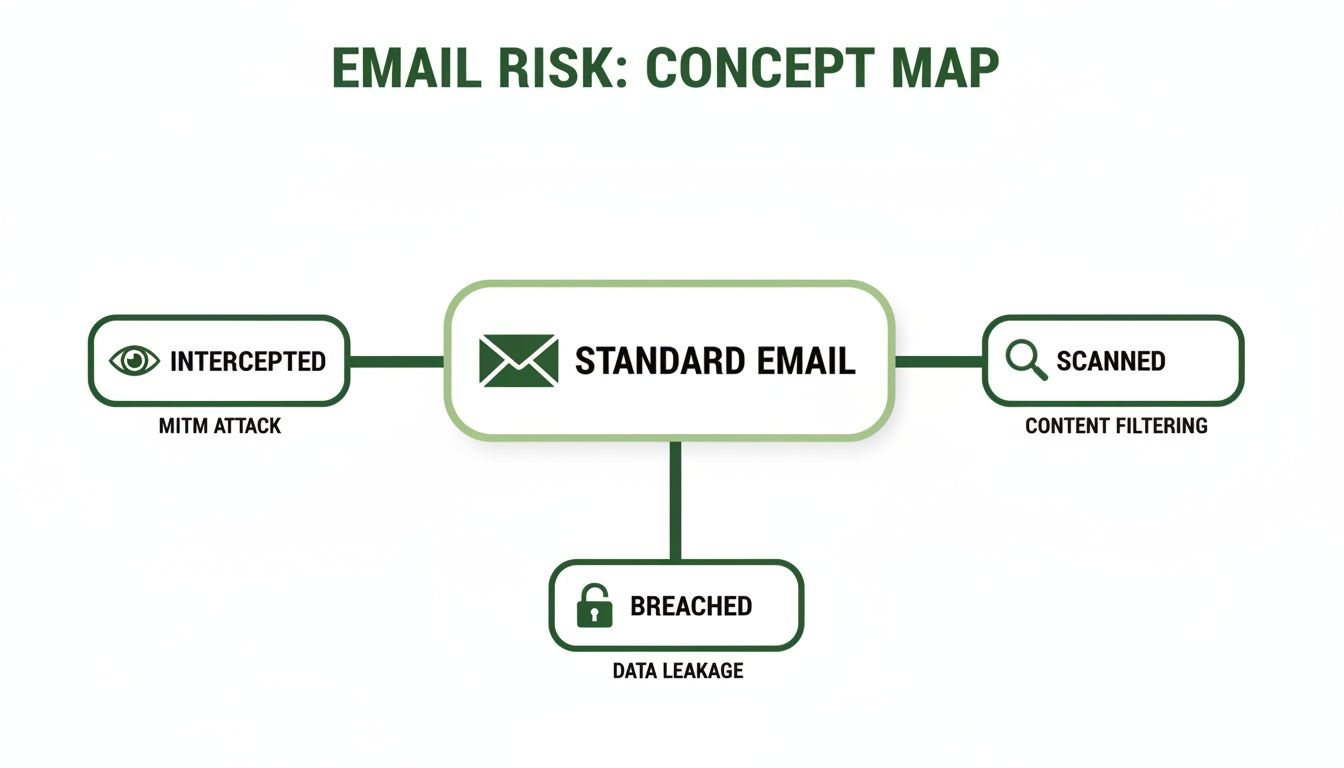
As you can see, standard emails can be intercepted in transit, scanned for data by providers, or exposed if a server is ever breached.
Why The Location Of Your Data Is A Big Deal
Another critical pillar of email privacy is data residency—that’s the physical, real-world location where your emails are actually stored. It’s a crucial detail because the country where your data lives dictates which laws protect it.
For example, choosing a hosted email platform that stores your email in Canada means it's shielded by strong federal privacy laws like the Personal Information Protection and Electronic Documents Act (PIPEDA).
A service provider's privacy policy is only as strong as the laws of the country it operates in. Choosing a provider in a jurisdiction with robust privacy laws adds a powerful legal shield to your technical protections.
To build a truly resilient security posture, it helps to align with proven frameworks. You can get a sense of how high-level strategies work by reading about global information security standards like ISO 27001 and AI-powered risk detection.
Comparing Standard vs. Secure Email
The gap between a standard, free email service and a dedicated secure, hosted email platform is wider than most people realise. Free services often treat security as an afterthought or a feature, whereas for secure providers, privacy is the entire foundation of their business. If you want to get into the technical weeds, check out our guide on what email authentication is.
But for a quick overview, the differences are stark. Let's lay them out side-by-side.
Standard Email vs Secure Hosted Email: A Quick Comparison
This table really highlights the trade-offs you make when using a free, ad-supported service versus a dedicated secure email platform.
| Feature | Standard Free Email (e.g., Gmail, Outlook) | Secure Hosted Email (e.g., Typewire) |
|---|---|---|
| Primary Encryption | TLS for data in transit; provider has access to data at rest. | End-to-end encryption (E2EE) by default; provider has zero access. |
| Business Model | Ad-supported; scans user data to sell targeted advertisements. | Subscription-based; privacy is the product, no ads or data mining. |
| Data Residency | Often stored in global data centres, subject to foreign laws. | Hosted in a specific privacy-friendly jurisdiction like Canada (PIPEDA). |
| Privacy Policy | Designed to permit data collection for advertising and service improvement. | Focused on protecting user data with a strict no-logs, no-scanning policy. |
Ultimately, it comes down to who you trust and what you're protecting. While free services are convenient, a secure, hosted email provider gives you verifiable control over your privacy and data.
How To Choose A Secure Email Provider
Now that you've got a handle on the fundamentals of email security, it's time to put that knowledge to work. The next step is picking a hosted email platform that actually builds its service around those principles. This goes way beyond flashy marketing slogans; it's about digging into a provider's technology, its business model, and even where its servers are located.
Your first clue to a provider's real priorities is how they make money. If a service is free and funded by advertising, you can bet their system is built to scan and analyse your data. Instead, look for services like Typewire that use a straightforward subscription model. When you're the paying customer, their primary job becomes protecting your email privacy, not selling your personal information to the highest bidder.
Core Features That Matter
When you're comparing different hosted email platforms, you need to focus on the features that offer real, tangible protection. True email security isn't just a buzzword; it's a foundation of solid, user-focused controls.
Here’s what I always look for:
- Zero-Access End-to-End Encryption (E2EE): This is the absolute non-negotiable. E2EE ensures that only you and the person you're emailing can ever read the message content. Not the provider, not a hacker, nobody else.
- Secure Data Residency: Where your data lives matters. Storing it in a country with robust privacy legislation, like Canada's PIPEDA, provides a crucial legal shield against overreach and unauthorized access.
- Ad-Free and No Tracking: A provider that's genuinely committed to privacy will never scan your emails, sell your data, or clutter your inbox with ads. Period.
It’s also worth looking for thoughtful extras, like automatic spy pixel blocking. Those tiny, invisible images tucked into promotional emails track when and where you open a message. A good secure provider will block these by default, shutting down a common marketing surveillance tactic.
Advanced Protection for Everyday Use
While strong encryption is the cornerstone, the best services layer on additional security features that make your life easier and safer. One of the most powerful tools in this category is support for email aliases.
Think of an alias as a disposable email address that forwards everything to your main inbox. You can create a unique one for every website, newsletter, or online service you sign up for. If an alias starts getting spammed or shows up in a data breach, you just delete it. Your real email address remains safe and sound. It's a surprisingly simple yet incredibly effective way to guard your digital identity.
Choosing a secure email provider is an investment in your digital autonomy. You're not just buying a service; you're adopting a platform designed to shield your personal information from the ground up, giving you control over who sees your data.
A provider’s ability to keep up with new threats is also critical. The latest National Cyber Threat Assessment confirms that ransomware is still a major threat for Canadian organisations. Even more concerning, phishing attacks—almost always delivered by email—are the fastest-growing problem, with nearly 65% of organisations expecting to see more of them.
To defend against this, you need a provider with intelligent, built-in anti-phishing and anti-spam filters. These systems do more than just look for keywords; they analyse message patterns and origins to stop malicious emails before they even have a chance to land in your inbox. For a deeper dive on what to look for, our guide on secure email services breaks it all down. By making these features your priority, you can choose a hosted email platform that truly has your back.
Simple Habits For Sending Secure Emails Daily
Picking a great secure email provider is a huge first step, but even the best tools are only as good as the person using them. If you really want to send an email securely, you have to combine the right technology with smart, consistent habits. Don't worry, these aren't complex technical tweaks; they're simple, manageable actions that can make a massive difference in your daily email security.
It all comes down to building a solid defence through mindful practices. By weaving a few key behaviours into your email routine, you'll dramatically lower your risk of falling victim to common threats like phishing, credential theft, and data leaks.
Master Your Passwords and Authentication
Your first line of defence for any online account is a strong, unique password. Reusing the same password across different services is like using one key for your house, car, and office—if a thief gets one, they get them all.
This is exactly why a password manager is no longer a "nice-to-have" tool; it's essential. A good one generates and stores long, complex passwords for every single site, meaning you only have to remember one master password. It’s probably the single biggest email security upgrade anyone can make.
Think of your password as the front door to your digital life. A password manager ensures every door has a different, unbreakable lock, and you don't have to carry around a giant ring of keys.
Beyond strong passwords, enabling two-factor authentication (2FA) is non-negotiable. 2FA adds a second layer of security by requiring something you have (like a code from your phone) in addition to something you know (your password). Even if a cybercriminal steals your password, they can't get into your account without your phone. This one step effectively stops the vast majority of account takeovers in their tracks.
Become a Phishing Spotting Pro
Phishing emails have gotten frighteningly convincing, often perfectly mimicking legitimate companies with flawless logos and professional language. But their goal is always the same: to panic you into clicking a malicious link and handing over your credentials. The best defence? A healthy dose of skepticism.
Before you click anything, always check these details:
- The Sender's Address: Don't just look at the display name; examine the full email address. Attackers often use subtle misspellings, like
support@micros0ft.com. - A Sense of Urgency: Phishing emails love to create panic. Watch out for threats or urgent warnings like "Your account will be suspended!" or "Suspicious activity detected!" designed to make you act without thinking.
- Generic Greetings: Be wary of emails that start with "Dear Customer" instead of your actual name. Most legitimate companies will address you personally.
If you ever get an email asking you to log in or update your information, never use the link in the email. Just open a new browser tab and go to the company's official website yourself. This simple habit completely neutralizes the threat.
Use Aliases to Protect Your Primary Address
One of the most powerful habits you can build for long-term email privacy is the strategic use of aliases. An alias is just a secondary email address that forwards messages to your main inbox, effectively hiding your real address from the outside world.
Let's say you're signing up for a new online store or a newsletter. Instead of giving them your real email, you can create a unique alias on the fly, like store.signup@yourdomain.com.
This approach gives you two major advantages:
- It contains data breaches. If that store ever gets hacked, only the alias is exposed, not your real, primary address.
- It stops spam at the source. If that alias suddenly starts getting junk mail, you know exactly who sold or leaked your data. You can just delete the alias, and the spam instantly stops.
By making these practices second nature, you can transform your email from a potential vulnerability into a secure communication channel, giving you peace of mind with every message you send.
Advanced Security Features For Your Business
When you're running a business, email security suddenly becomes a much bigger game. It's no longer just about protecting your own inbox; you're now responsible for safeguarding your entire team, your clients, and the reputation you've worked so hard to build. This means shifting from personal security habits to implementing robust, platform-level features from a hosted email platform that protect the whole organisation.
One of the most immediate and impactful moves you can make is switching to a custom domain for your email. An address like contact@yourbusiness.ca just looks more professional and trustworthy than a generic Gmail or Outlook account. But beyond appearances, it gives you complete administrative control over your entire email ecosystem—the true foundation of business-grade email security.
Centralized Control and User Management
Using a custom domain on a secure hosted email platform like Microsoft 365 or Google Workspace unlocks a central dashboard, which is your command centre for managing every email account in your organisation.
Think about it. A new hire is starting Monday. From a single admin panel, you can create their account and apply all the necessary security policies before they even walk in the door. Just as importantly, if an employee leaves, you can suspend or delete their account instantly, cutting off access to sensitive company data. This simple action closes a huge security gap that many businesses overlook.
For a business, centralized user management isn't just a convenience; it's a critical security control. It ensures consistent security policies and provides immediate control over data access as your team changes, preventing potential breaches before they happen.
System-Wide Threat Protection
While encouraging good habits is important, you can't rely on every single employee to spot every single threat. That's where system-wide anti-spam and malware filters come in. A proper hosted email platform applies powerful, constantly updated filtering across every inbox in your organisation, acting as a unified shield.
This system catches malicious attachments and sophisticated phishing scams before they ever reach an employee's screen, dramatically reducing the chance of someone making a costly mistake. For businesses that handle sensitive information, exploring specialized Microsoft 365 and Azure security services can offer even more advanced, enterprise-level protection.
A huge plus for businesses looking to upgrade is the availability of guided domain migration. These services take the headache out of what can be a complex process, helping your team move existing emails, contacts, and calendars over to the new, secure platform with minimal disruption. It makes it entirely feasible for even small businesses without a dedicated IT department to seriously level up their email security. By adopting these features, you not only learn to send email securely but also build a more resilient and professional operation.
Got Questions About Secure Email? We've Got Answers
Switching to a secure email service is a big step, and it's completely normal to have a few questions before you dive in. You might be wondering about how it all works, what features to look for, or if it’s genuinely worth the effort. Let's tackle some of the most common questions head-on to help you feel confident about protecting your digital conversations.
Is Adding 'Confidential' to the Subject Line Actually Secure?
Not at all. This is probably one of the biggest myths in email security. Tacking "confidential" onto your subject line is purely cosmetic—it provides exactly zero technical protection. Think of it as writing "private" on a postcard. Anyone who intercepts it can still read it.
Real email security comes from the technology working behind the scenes. Protocols like TLS protect your email in transit, and end-to-end encryption (E2EE) ensures that only you and your recipient can ever read the message's contents. The protection is baked into the process, not just sprinkled on top.
Do I Need to Be a Tech Whiz to Use Encrypted Email?
Absolutely not. The best secure email platforms today are built for everyday people, not just IT experts. The whole point is to make email privacy accessible. The heavy lifting, like zero-access encryption and key management, all happens automatically in the background.
Honestly, if you can handle Gmail or Outlook, you'll feel right at home with a secure email client. The user experience is designed to be just as intuitive.
The best email security is the kind you don't even have to think about. It should just work, protecting you by default without you needing to fiddle with settings or follow a complicated checklist. That’s the sign of a truly well-designed secure email service.
Can I Use My Own Domain with a Secure Email Service?
Yes, and you absolutely should if you're running a business. Most professional secure email providers let you bring your own custom domain. This is essential for maintaining your brand's professional image and building trust with clients, all while getting a massive upgrade to your email security.
These hosted email platforms typically come with all the admin tools you need to manage your team's accounts, making it easy to add new employees or adjust permissions as your organization grows.
What’s the Single Most Important Feature to Look For?
While a layered defence is always best, if you had to pick just one thing, it would be end-to-end encryption (E2EE). It's the gold standard. E2EE is the only technology that guarantees no one—not even your email provider—can access the content of your messages.
But a close second is the provider's overall philosophy on privacy. To truly send an email securely, you need a service that has an ad-free business model and stores your data in a country with robust privacy laws. A feature is only as good as the company that implements it.
Ready to take back control of your inbox? Typewire offers Canadian-hosted, zero-access encrypted email that puts your privacy first. With no ads, no tracking, and powerful security features built-in, you can finally communicate with confidence. Start your free 7-day trial today and experience a truly private inbox.
The post How to Send Email Securely: A Guide to Real Privacy & Security appeared first on Typewire.
How to Send Email Securely: A Guide to Real Privacy & Security
Posted: 2026-01-16
How to Whitelist an Email Address (So You Stop Missing Messages)
Posted: 2026-10-06
Email Bounce Explained: Soft vs Hard Bounces & How to Fix Them
Posted: 2026-10-02
Which Secure Email Provider Fits Your Workflow? 10 Options by Use Case
Posted: 2026-09-29
Personal Data Privacy: Why Your Email Is the Master Key to Your Digital Life
Posted: 2026-09-24
Secure Email Gateway Guide: Do You Need One?
Posted: 2026-09-23
Average Email Deliverability Rate: 2026 Benchmarks
Posted: 2026-09-18
Phishing vs Spam: What’s the Difference?
Posted: 2026-09-15
PIPEDA vs GDPR Key Differences for Businesses
Posted: 2026-09-11