How to Create a Personal Email Domain for Ultimate Email Security and Privacy
To create an email address on your own domain, you first need to register a domain name and then connect it to a secure hosted email platform. This setup puts you in complete control of your digital identity, freeing you from generic email services that mine your data for profit. It’s a powerful move that significantly boosts your email privacy, security, and professional image.
Why a Personal Domain Is Your Best Defence for Email Privacy
Let's be clear about "free" email services from big tech. When you sign up, you're accepting a trade-off. In exchange for a mailbox, the provider scans your messages to build a detailed profile for advertisers. You're not the customer; you're the product.
Creating an email on your own domain completely flips that model. Instead of renting a digital mailbox, you own the address. An address like hello@yourname.ca isn't just a professional touch—it's a declaration of digital independence and a commitment to email security.
Take Control of Your Email Privacy
True email privacy begins with ownership. When you control the domain, you decide which hosted email platform handles your messages and what their policies are. This empowers you to partner with a provider that prioritizes your privacy above all else.
Here’s what you gain:
- Freedom from Data Mining: A privacy-first email host has a simple business model: you pay a small fee for a secure, private service. They have zero incentive to scan your emails for ad-related keywords.
- A Professional Edge: An email address tied to your personal brand instantly builds trust and credibility, showing you take your communications seriously.
- Better Protection from Data Breaches: Massive free email providers are prime targets for hackers. A smaller, security-focused hosted email platform is a much less attractive target, reducing the risk of your data being compromised in a large-scale breach.
This move shifts you from being a user in a giant, data-hungry system to a valued customer with clear rights and robust protections.
Owning your email domain is the first, most crucial step toward digital sovereignty. Your email address stays with you for life, no matter which provider you use. You have the freedom to switch hosts anytime without losing your core identity.
The Power of a Secure Hosted Email Platform
Choosing the right hosted email platform is as critical as owning the domain. A quality provider will use a zero-access architecture, meaning your messages are encrypted in such a way that not even their staff can read them. This is a powerful technical guarantee that your conversations remain confidential.
Furthermore, choosing a provider in a country with strong privacy laws—like Canada, with its Personal Information Protection and Electronic Documents Act (PIPEDA)—adds a significant layer of legal protection. This jurisdictional advantage ensures your data is handled under strict rules designed to protect you, not corporate interests.
By pairing your own domain with a secure hosted email platform, you build a digital fortress around your communications. You are no longer a data point in an advertising machine; you are the owner of your inbox, with total control over your email security. That’s the real reason why learning how to create a personal email domain is an essential skill for anyone serious about digital privacy.
Choosing and Registering Your Domain Name

This is where you claim your piece of the internet. Your domain name is the foundation of your new email address, so taking the time to choose the right one will pay off for years to come.
Think of it as your digital address. It should be easy for people to remember and type without errors. Avoid hyphens and numbers if possible, as they often lead to confusion. Simplicity is your greatest asset here.
Brainstorming Your Perfect Domain
Let's start by exploring ideas based on your name or profession. If your name is common, you may need to get creative.
Here are a few popular approaches:
- Your Full Name: This is the most direct option, like
yourname.ca. It’s ideal for personal branding. - Initial and Last Name: A great alternative if your full name is taken, such as
jdoe.com. - Name and Profession: Adding your field, like
janedoedesign.io, immediately communicates what you do.
Once you have a shortlist, you'll need to select a Top-Level Domain (TLD)—the extension at the end, like .com, .ca, or .io. While .com remains highly recognizable, newer TLDs or country-specific ones like .ca can help you secure the name you want. For more details on this, our guide on what domain name registration is is a helpful resource.
With your ideal name chosen, the next step is finding the best domain name registrar to make it official. A registrar is an accredited company that reserves domain names.
The Non-Negotiable Step: Domain Privacy for Email Security
This is a critical piece of advice that is often overlooked. When you register a domain, your personal information—name, address, email, and phone number—is typically published in a public database called WHOIS. This is a major email privacy risk, inviting spammers and marketers to contact you.
Adding WHOIS privacy protection during registration is essential. This service replaces your personal details with the registrar's information, acting as a digital shield. Think of it as an unlisted phone number for your domain.
Most reputable registrars offer this service, often called "Domain Privacy" or "ID Protection," for a small annual fee. Given that over 80% of all email is spam, this is a worthwhile investment to protect your information from data scrapers. It's a foundational step in building a genuinely private and secure email system.
Choosing a Hosted Email Platform That Genuinely Respects Your Privacy
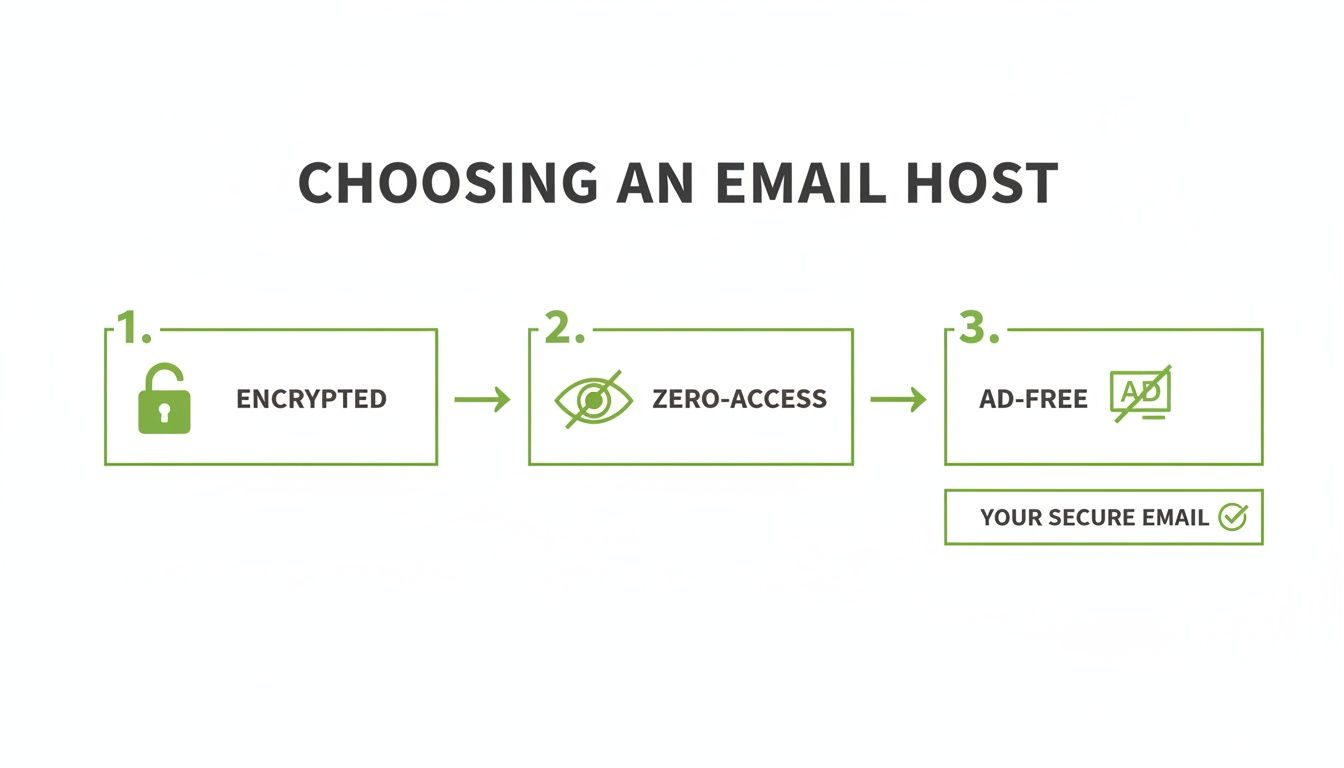
You have your domain name—now for the most important decision: choosing where your email will live. This isn't just about selecting a mailbox. It's about entrusting your private conversations to a partner, a choice that will define your email security and privacy for years.
It’s tempting to forward mail from your new domain to a free service like Gmail. However, this completely undermines your goal of creating a private email. You would be building a secure new house only to hand the keys back to the data miners you sought to avoid.
The correct approach is to use a dedicated hosted email platform—one built from the ground up to protect user privacy. Their business model is transparent: you pay a fee for a secure service. You are the customer, not the product.
What to Look for in a Privacy-First Email Host
When comparing hosted email platforms, the difference between those that sell your data and those that protect it becomes obvious. A true privacy-focused host offers more than a service; they make a philosophical commitment to safeguarding your personal information.
Here are the non-negotiables for optimal email security:
- Zero-Access Architecture: This is a technical guarantee that no one but you can read your emails. Messages are encrypted before they reach the server, meaning even the provider's own staff cannot access the content.
- End-to-End Encryption (E2EE): While zero-access protects data at rest on servers, E2EE protects it in transit. It secures your message from the moment you send it until the recipient opens it, making it unreadable to anyone in between.
- Strict No-Ads and No-Tracking Policies: The company should earn its revenue from subscriptions only. Their privacy policy must state clearly that they do not scan your email content for anything other than spam filtering.
- Jurisdictional Protection: The company's headquarters location matters. Providers based in countries with strong data privacy laws, like Canada's Personal Information Protection and Electronic Documents Act (PIPEDA), offer an extra layer of legal protection.
The core difference is this: Standard free email was built to serve advertisers by gathering data. Private hosted email platforms are built to serve you by protecting it. Understanding this is key to creating a personal email domain that truly delivers on its promise of security.
Comparing Hosted Email Platform Philosophies
The contrast between the two models is stark. One is engineered for mass data collection, while the other is purpose-built for individual protection.
Here's a quick comparison.
| Feature | Privacy-Focused Hosted Email Platform (e.g., Typewire) | Standard Free Email Provider |
|---|---|---|
| Business Model | Subscription-based; you are the customer. | Ad-supported; you are the product. |
| Data Handling | Zero-access encryption; no content scanning. | Scans email content for ad targeting. |
| Email Security Focus | Proactive, with features like spy pixel blocking. | Reactive; security is a feature, not the core mission. |
| User Control | You own your data and can easily migrate. | You are locked into their ecosystem. |
This table clarifies that choosing a host is a critical email security decision. When you partner with a provider like Typewire, which operates on Canadian infrastructure protected by strong local privacy laws, you gain both technical and legal safeguards.
For a deeper look at services that champion these principles, our guide to the best custom domain email providers for 2025 is a great next step. A little research now ensures your new email is not just professional, but genuinely private and secure.
Pointing Your Domain to Your New Hosted Email Platform
You've secured your domain and chosen a privacy-first hosted email platform. Now, it's time to connect them. This part involves configuring DNS records, which is mostly a copy-and-paste task.
You'll work within your domain registrar's dashboard to modify your DNS records. These records tell the internet where to deliver mail sent to your new custom address. Correct configuration is essential not only for functionality but also for establishing a trustworthy email identity. These records act as a digital passport, verifying that your emails are legitimate and preventing them from being marked as spam.
Understanding DNS Records for Email Security
Log in to your domain registrar and find the "DNS Management" section. Your new hosted email platform will provide specific values to add here.
Here’s a breakdown of the key records for email security:
- MX (Mail Exchanger) Record: This is the most important record. It directs all incoming mail for your domain to your email host's servers.
- SPF (Sender Policy Framework) Record: This security feature lists all servers authorized to send emails on behalf of your domain. It helps prevent spammers from "spoofing" your address.
- DKIM (DomainKeys Identified Mail) Record: Working with SPF, DKIM adds a unique digital signature to every email you send. Receiving servers verify this signature to confirm the email is genuinely from you and hasn't been altered in transit.
Together, these three records build a strong reputation with major email providers, ensuring your messages land in the inbox.
Adding DMARC: The Ultimate Email Security Shield
Once SPF and DKIM are configured, you can add the final layer of email security: DMARC (Domain-based Message Authentication, Reporting, and Conformance).
This record tells receiving mail servers what to do if an email claiming to be from you fails either the SPF or DKIM check.
You can instruct them to:
- Monitor: Allow the message but send you a report about the failure.
- Quarantine: Send the suspicious email to the recipient's spam folder.
- Reject: Block the fraudulent email from being delivered entirely.
DMARC provides visibility into impersonation attempts and allows you to enforce strict rules to protect your domain's reputation from phishing attacks. While a guide on setting up your own email server offers deeper insights, a hosted solution is the best choice for most users.
Properly configuring SPF, DKIM, and DMARC is the industry standard for secure email. It’s how you prove you're a legitimate sender, which is absolutely crucial for deliverability.
Making the Connection
Your hosted email platform (like Typewire) will provide the exact values for each record. Log into your domain registrar, navigate to the DNS settings, and create new records for MX, SPF, and DKIM, copying the information from your email provider.
After saving the changes, they need to propagate across the internet, which can take from a few minutes to 48 hours. Once propagation is complete, your custom domain will be fully linked to your new, secure email host.
Moving In: Migrating Your Data and Securing Your New Account
Your new private email address is live on a secure, hosted platform. Now, it's time to transfer your old emails and contacts and fortify your new account's security.
Most quality hosted email platforms offer built-in import tools that can connect to your old provider and pull everything across, including emails, folders, and contacts.
A Roadmap for a Smooth Transition
Before you start the import, clean out your old inbox. This is the perfect opportunity to delete old newsletters, archive what you don’t need, and organize your folders. A tidy account will make the migration faster and more efficient.
After cleaning up, begin the import process. Depending on the amount of data, this can take anywhere from a few minutes to several hours. For a detailed walkthrough, our guide on how to switch email providers without losing data covers every step.
Keep your old email account active for a month or two. This provides a buffer to catch any stray emails and update your login details on other online services that still use your old address.
Fortifying Your New Email Account's Security
With your data migrated, your top priority is email security. The most critical step is to enable two-factor authentication (2FA).
2FA acts as a second lock on your account. Even if a hacker steals your password, they cannot log in without the second verification code from your phone. Since weak passwords contribute to over 80% of data breaches, 2FA is essential.
Next, install your email account on all your devices. Privacy-focused hosted email platforms often provide their own dedicated apps, which are optimized for security and ensure features like end-to-end encryption function correctly.
Using Aliases for Proactive Email Privacy
One of the best features of having your own email domain is the ability to create email aliases. An alias is a disposable, forwarding address that sends mail to your main inbox without revealing your primary address.
Use unique aliases for different services:
shopping.deals@yourdomain.canewsletter.updates@yourdomain.casocial.media@yourdomain.ca
If an alias starts receiving spam, you know which service leaked your information. You can then delete that alias to stop the spam instantly. This is a brilliant strategy for keeping your main inbox clean and protecting your primary address from exposure in data breaches.
A Few Common Questions About Personal Email Domains
Even with a clear path, you might have questions about the practicalities of owning an email domain. This is a significant step toward controlling your digital identity, so let's address some common queries.
Can I Use My Personal Email Domain for Business?
Absolutely. It's one of the quickest ways to enhance your professional image.
An email like your.name@yourbusiness.com signals that you are serious and established, building trust more effectively than a generic address. It shows clients and partners that you are invested in your brand.
Beyond appearances, using your own domain with a secure hosted email platform dramatically improves your business's email security. You gain control over security policies and are less exposed to large-scale data breaches. Many privacy-first hosted email platforms offer plans to manage multiple users under one domain, allowing your entire team to present a consistent, professional front.
What Happens If I Want to Switch Email Hosts Later?
This is the greatest advantage of owning your domain. Your email address (you@yourdomain.ca) belongs to you forever, independent of the company that handles your mail.
Like a mobile phone number, you can switch carriers anytime without losing your core identity. The power is entirely yours.
If your current email host no longer meets your needs for email privacy, features, or price, you can migrate to a new one. The process is simple:
- Sign up with a new, privacy-respecting hosted email platform.
- Migrate your existing emails and contacts to the new service.
- Update your domain's MX records to point to the new host.
You are never locked into a service that compromises your email privacy or falls behind on security.
Is This Whole Process Too Technical for a Beginner?
Terms like "DNS records" and "MX configuration" can sound intimidating, but modern domain registrars and hosted email platforms have simplified the process. Most of the work involves copying a few lines of text from your email host and pasting them into your domain registrar’s settings.
The best providers offer step-by-step guides with clear instructions. The initial setup typically takes less than 30 minutes.
The small, one-time investment in learning this process pays dividends for a lifetime. You gain digital ownership, enhanced email security, and freedom from Big Tech's data mining.
How Much Does a Personal Email Domain Cost?
The cost is broken down into two parts: domain registration and email hosting.
- Domain Registration: A
.comor.cadomain typically costs $15 to $25 per year. - Email Hosting: A secure, private hosted email platform is a separate subscription. Prices are generally affordable, especially with annual plans.
While free email services exist, you pay with your privacy and personal data. By investing a small amount in a paid service, you become the customer, not the product. This ensures your private communications remain private, secure, and free from surveillance.
Ready to own your email and protect your privacy? Typewire offers secure, ad-free, zero-access encrypted email hosted on private Canadian infrastructure. With powerful features like spy pixel blocking and unlimited aliases, you get complete control over your inbox. Start your 7-day free trial and experience the difference.
The post How to Create a Personal Email Domain for Ultimate Email Security and Privacy appeared first on Typewire.
How to Create a Personal Email Domain for Ultimate Email Security and Privacy
Posted: 2026-01-02
What Is Spear Phishing and Why Targeted Attacks Hit Harder
Posted: 2026-10-16
What Is Smishing and How to Avoid SMS Phishing
Posted: 2026-10-13
How to Whitelist an Email Address (So You Stop Missing Messages)
Posted: 2026-10-06
Email Bounce Explained: Soft vs Hard Bounces & How to Fix Them
Posted: 2026-10-02
Which Secure Email Provider Fits Your Workflow? 10 Options by Use Case
Posted: 2026-09-29
Personal Data Privacy: Why Your Email Is the Master Key to Your Digital Life
Posted: 2026-09-24
Secure Email Gateway Guide: Do You Need One?
Posted: 2026-09-23
Average Email Deliverability Rate: 2026 Benchmarks
Posted: 2026-09-18