How to Host a Mail Server for Ultimate Email Privacy and Security
When you decide to host a mail server, you're making a conscious choice to take full control of your digital communication. It means setting up and managing the entire system—the hardware and software—that sends, receives, and stores your email. Think of it as moving out of a rented apartment, where the landlord spies on you, and building your own secure house. You're in charge of everything, from the digital locks on the doors to the encrypted foundation it's built on.
This move puts you squarely in the driver's seat for email privacy and email security, pulling you away from third-party services that often treat your data as a product. It's a significant step, but a powerful one, toward reclaiming your digital sovereignty and ensuring your conversations remain confidential.
Why Reclaim Your Email with a Private Server?
In a world where our personal data is constantly being mined, scanned, and sold, the decision to run your own mail server is really about one thing: ownership. "Free" email services aren't truly free; you pay with your privacy. These providers scan your emails for keywords to sell you ads, build detailed profiles on your behavior, track your purchases, and monitor your contacts.
A self-hosted server stops all of that cold. Your data belongs to you and you alone. It is never scanned, analyzed, or monetized.
This level of control naturally extends to security. You're no longer at the mercy of a third party's security practices, which may be designed for mass-market convenience rather than maximum protection. Instead, you get to choose and implement the exact encryption methods, access rules, and security layers that meet your standards, creating a private fortress for your communications.

Taking Back Control From Big Tech
Choosing to host your own mail server is your ticket out of the data-hungry walled gardens built by giant tech companies. You make the rules. No more worrying about random account suspensions, invasive privacy policy changes, or a service you depend on suddenly being discontinued.
Here’s what that freedom and security really look like:
- Absolute Data Privacy: Your emails sit on your server. No advertisers, data miners, or third parties can access them. You control who sees your data, full stop.
- Tailored Security: You can enforce military-grade encryption for data both in transit and at rest, integrate specialized security tools, and configure your firewall precisely how you want it.
- No More Vendor Lock-In: Getting your data out of a big email provider can be a nightmare. When you own the infrastructure, you can migrate or change how you manage your email whenever you want.
- Freedom From Limits: Forget about tiny attachment size limits or restrictive sending quotas that get in your way. You decide what your system can handle.
This isn't just a technical project; it's a philosophical stance. Hosting your own mail server is a statement that your private conversations are just that—private. They deserve to be shielded from corporate surveillance and data breaches.
Understanding the Modern Email Landscape
Back in the 1990s, plenty of companies hosted their own email. Then came the cloud, and everyone shifted toward convenience. But email never went away; in fact, its role has only expanded. The number of emails sent and received each day is expected to blow past 408 billion by 2027, which shows just how essential it remains.
This massive scale, combined with the complexities of fighting sophisticated spam and cyber threats, makes self-hosting a serious commitment. But for those who value privacy and control above all else, the rewards are well worth the effort. You can dive deeper into these trends with these insightful email marketing statistics on Hostinger.com.
The decision to self-host or use a secure hosted email platform isn't always clear-cut. Here’s a quick breakdown to help you weigh the options.
Self-Hosting vs Hosted Email: A Comparison
| Feature | Self-Hosted Mail Server | Privacy-Focused Hosted Email Platform |
|---|---|---|
| Control | Complete control over hardware, software, and policies. | Limited to the provider's settings and features. |
| Privacy | Maximum privacy; your data is not scanned or sold. | High privacy; providers build their business on not scanning data. |
| Cost | Upfront hardware/server costs + ongoing maintenance time. | Predictable monthly/yearly subscription fees. |
| Maintenance | You are responsible for all updates, security, and uptime. | The provider handles all maintenance and security. |
| Customization | Infinitely customizable to your specific needs. | Limited to what the provider offers. |
| Deliverability | You must manage your own IP reputation and anti-spam records. | Generally high deliverability due to established reputation. |
| Complexity | High. Requires significant technical expertise. | Low. Designed for ease of use. |
Ultimately, choosing to host your own mail server is a trade-off. You're swapping the plug-and-play convenience of a hosted email platform for complete, unfiltered control over a critical part of your digital life. For anyone who believes their email should be truly private and secure, it’s a powerful and liberating solution.
Preparing Your Server Environment
Before you touch any mail software, you have to lay the groundwork. This is the most critical part of the whole process. Getting your server and network configured correctly from the start will save you from endless headaches with email deliverability and email security down the road. It’s all about creating a stable, trustworthy home for your email.
First things first: where will your server live? For nearly everyone diving into self-hosting, the answer is a Virtual Private Server (VPS) or a dedicated server from a solid hosting provider. A VPS usually hits the sweet spot—it gives you plenty of control and performance without the hefty price tag of a dedicated machine.
The one absolute non-negotiable here is a static IP address. Your server needs a permanent, unchanging address on the internet. If you try to run this on a home connection with a dynamic IP that changes, you’re basically telling other mail servers you can’t be trusted. Your emails will almost certainly end up in the spam folder, undermining your entire effort.
Your Digital Address: DNS Configuration
Okay, you've got a server with a static IP. Now it's time to set up your DNS records. Think of DNS as the internet's phone book; it tells everyone else how to find your mail server when an email is sent to your domain. If you mess this up, nothing else matters. This is the foundation of your sender reputation and a key part of your security posture.
You need to get three foundational DNS records configured correctly right out of the gate:
- A Record (Address Record): This is the most basic one. It points a hostname, like
mail.yourdomain.com, to your server's static IP address. Simple, but essential. - MX Record (Mail Exchanger): This record explicitly tells the world, "This server right here is in charge of email for my domain." When Gmail needs to deliver a message to you, it looks for this record first.
- PTR Record (Pointer Record): This is often called a Reverse DNS record, and it does the opposite of an A record—it maps your IP address back to your hostname. Many email servers check this as an anti-spam measure. A missing or mismatched PTR record is a huge red flag for security filters.
Getting these three records right is your first major step toward being seen as a legitimate sender. It's how you prove to the big players like Outlook and Gmail that you're not just another spammer popping up overnight.
Choosing Your Operating System and Core Components
With the networking sorted, you need to pick an OS. The overwhelming majority of mail server software is built for Linux, and for good reason. A solid, stable distribution like Ubuntu Server or Debian is your best bet. They have massive communities, great documentation, and a track record of reliability—exactly what you want for a service that needs to be always-on and secure.
It's also helpful to realize you're not installing a single "email program." A mail server is actually a stack of different tools working in concert. Each one has a specific job.
The three main players are:
- Mail Transfer Agent (MTA): This is the workhorse. Software like Postfix or Exim acts like the post office, handling the sending and receiving of emails with other servers over the internet using the SMTP protocol.
- Mail Delivery Agent (MDA): Once the MTA receives an email, it hands it off to the MDA. The MDA’s job is to put that message into the correct user’s mailbox on your server.
- IMAP/POP3 Server: This is what lets you actually read your email. A program like Dovecot (the undisputed king in this space) allows your phone, laptop, or webmail client to connect and sync your messages.
Thinking about it this way gives you a clear picture of how mail flows through the system you're about to build. For a more detailed breakdown of the domain side of things, our guide on how to set up a custom email domain is a perfect companion to these server prep steps. Once this foundation is solid, you're ready to start installing the software.
Building a Secure Email Server From Scratch
Now that the server environment is ready to go, it’s time to build the core of your private email system. This is where we turn that blank server into a fully functional, secure hub for all your communications. Our goal isn't just to get it running; it's to construct a hardened fortress that's built from the ground up to respect and protect your email privacy.
For this guide, we'll be working with a classic, battle-tested software combination: Postfix as the Mail Transfer Agent (MTA) and Dovecot as the IMAP/POP3 server. In the world of self-hosting, these two are the gold standard for a reason—they're incredibly reliable, performant, and packed with robust security features.
Installing Your Core Email Software
Think of Postfix as the engine of your mail server. It’s the digital postman responsible for sending and receiving messages. Dovecot, on the other hand, is the secure vault. It manages your actual mailboxes and gives your email clients a safe way to access your messages.
Getting them installed on a modern Linux distro like Ubuntu or Debian is pretty straightforward. The real magic, however, happens in the configuration files. This is where you’ll meticulously define how your server behaves, what rules it follows, and which security standards it strictly enforces.
The default settings for most mail server software are designed for functionality, not maximum security. It's your job to meticulously review and tighten every setting, leaving no door unlocked for potential attackers.
Encrypting Communications with TLS
Let’s be clear: sending unencrypted email today is simply not an option. Every single connection to your server must be encrypted, whether it's you checking your inbox or another server delivering a message. This is where Transport Layer Security (TLS) comes into play, and thankfully, getting a free, trusted TLS certificate is easier than ever with Let's Encrypt.
By properly implementing TLS, you ensure all data flying back and forth is completely scrambled and unreadable to anyone trying to eavesdrop. This protects everything from your login credentials to the actual content of your emails, forming the bedrock of your email security.
Setting up Let's Encrypt certificates for both Postfix and Dovecot is a non-negotiable step. It’s what turns your server from a hobby project into a trusted and secure participant on the global email network.
Building Your Digital Fortress
A live, functional mail server is an immediate and constant target for automated attacks. Your next layer of defense involves locking down the server itself to block unauthorized access before it even starts. This is where a well-configured firewall and an intrusion prevention tool become your best friends.
- Configuring a Firewall: Your server's firewall (like UFW on Ubuntu) acts as a bouncer at the door. It needs to be told exactly which network ports can be open. You should only allow traffic on essential ports for mail services (like SMTP and IMAP) and SSH for your own management, blocking everything else by default.
- Automating Defense with Fail2ban: This is a seriously clever tool that constantly scans your server's log files for shady activity, like thousands of failed login attempts from the same IP address. When it spots a brute-force attack, it automatically blocks the offender's IP right at the firewall, stopping them dead in their tracks.
Building a secure email server is paramount to protect sensitive data and prevent unauthorized access. For broader insights into maintaining digital security, consider exploring various cybersecurity resources.
The Importance of Compatibility and User Experience
As you build this out, never forget that you're creating a service that needs to play nicely with the rest of the world. The global email user base is absolutely massive—it's expected to grow beyond 4.8 billion people by 2027.
A huge slice of this pie is dominated by just a few clients. As of mid-2024, Apple Mail accounts for up to 53% of all email opens, with Gmail right behind at around 30.7%. This means your server must be configured to "speak the language" these big players expect to ensure your emails are delivered properly and look right when they arrive. For more details on these user trends, you can discover more insights about email marketing statistics on Optinmonster.com.
Ultimately, a self-hosted server gives you a level of email privacy that's tough to beat. While TLS secures the connection, true end-to-end security for the message content itself often requires another layer. You might be interested in our guide on how PGP encryption for email works to take your privacy even further. By combining a hardened server with strong encryption practices, you create a truly private communication channel that puts you firmly in control.
Ensuring Your Emails Actually Get Delivered
So, you've built your fortress and your mail server is running. That's a huge win, but it's really only half the job. What good is a server if every email you send goes straight to the recipient's spam folder?
Welcome to the tricky, and often maddening, world of email deliverability. Your server's reputation is everything here. You have to prove to the big players—Gmail, Outlook, Yahoo—that you're one of the good guys, not a spammer. To do that, you need to set up your server's official ID.
The Three Pillars of Email Authentication
Think of these DNS records as your server's digital passport. They work in tandem to vouch for your identity, proving you are who you say you are. Without them, you’re an anonymous stranger, and spam filters will treat you as a security threat.
- SPF (Sender Policy Framework): This is the first, most basic checkpoint. It's a simple list, published in your DNS, of all the IP addresses authorized to send email for your domain. When an email arrives, the receiving server glances at this list. If the sending IP isn't on it, that's an immediate red flag.
- DKIM (DomainKeys Identified Mail): This adds a much-needed layer of integrity. DKIM attaches a unique, tamper-proof cryptographic signature to each email. The receiving server then uses a public key (which you also publish in your DNS) to verify that the message hasn't been secretly altered on its way to the inbox.
- DMARC (Domain-based Message Authentication, Reporting, and Conformance): This is the rulebook that ties it all together. DMARC tells other servers exactly what to do if an email claiming to be from you fails either the SPF or DKIM check. You can tell them to quarantine it (send to spam) or reject it entirely. This is crucial for stopping others from spoofing your domain and ruining your reputation.
Make no mistake: setting up all three is non-negotiable. It’s the foundational step that transforms your server from a potential threat into a trusted communicator in the eyes of the internet's gatekeepers.
The whole process is a sequence. You build the server, you lock it down with encryption, and then you protect it with a firewall.
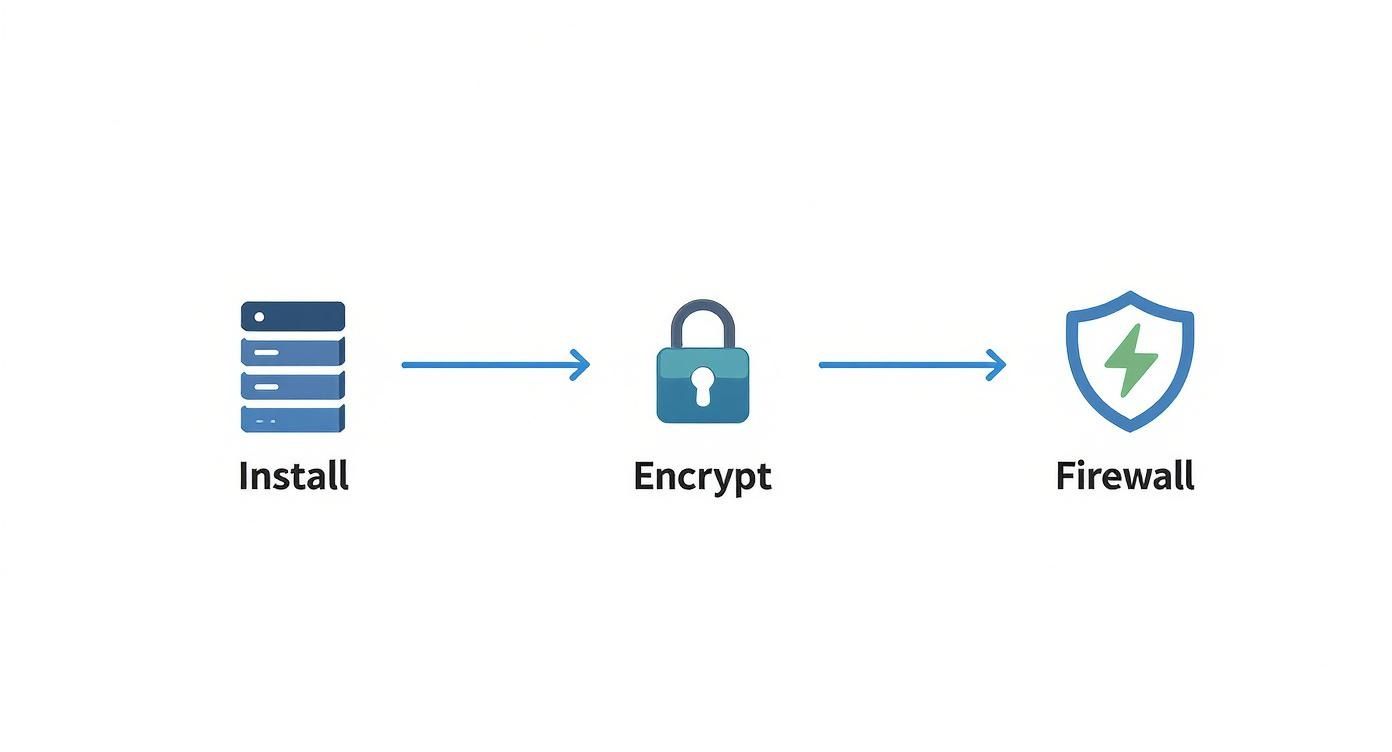
This workflow shows that a working server is just the starting point. Good deliverability is built on a secure foundation.
Warming Up Your IP and Protecting Your Reputation
A brand-new server with a fresh IP address has zero history. To other mail servers, that's just plain suspicious. You can't just fire up the engine and start sending thousands of emails on day one; you'll get blacklisted almost instantly.
You have to "warm up" your IP address. This means starting slow and gradually increasing your sending volume over several weeks.
This process is all about building trust and a positive sending history. Begin by sending a handful of emails to people you know will open them and interact. As you slowly ramp up the volume, email providers will see a consistent pattern of legitimate, wanted mail coming from your IP.
Keeping that good reputation is an ongoing chore, not a one-and-done setup. A few things can tank it fast:
- High Bounce Rates: Sending emails to tons of non-existent addresses signals that your mailing list is low-quality.
- Spam Complaints: This is the kill shot. A few users marking your emails as spam can get you blacklisted in a hurry.
- Hitting Spam Traps: These are secret email addresses used by anti-spam services to catch spammers. Sending to one is a sign you're not following best practices.
If you're ready to get your hands dirty with the technical side, our real-world guide to setting up email authentication has a detailed, practical walkthrough.
When to Consider a Hosted Email Platform
Let's be brutally honest for a moment: managing email deliverability can feel like a full-time job. It demands constant vigilance, technical tweaks, and staying on top of a landscape that changes all the time. For a lot of people and businesses, the required effort is simply not worth the hassle.
This is exactly where privacy-first hosted email platforms like ProtonMail, Fastmail, or even Typewire come in. They offer a very compelling alternative. These services take care of all the gritty details of server management and deliverability for you. They have entire teams dedicated to maintaining pristine sender reputations, making sure your emails just work.
Sure, you trade the absolute control of self-hosting for convenience. But in return, you get peace of mind and win back countless hours you'd otherwise spend troubleshooting. If you prioritize email privacy and email security but don't have the deep technical expertise (or the time), a secure hosted solution offers the perfect middle ground between "free" services and running everything yourself.
Server Maintenance and Hosted Email Alternatives
https://www.youtube.com/embed/Pn90XAGxLZ4
Getting your mail server online is a huge win, but don't pop the champagne just yet. The real marathon begins after you’ve launched. A mail server isn’t a toaster you plug in and forget about; it’s a dynamic system that demands constant vigilance to stay secure, reliable, and out of spam folders.
Think of it this way: you wouldn't buy a race car and then skip the oil changes, tire checks, and engine tune-ups. Your server needs that same level of routine care to perform at its peak and fend off the constant threats lurking online.
The Never-Ending Work of a Server Admin
Running a server is a job of many hats, and neglecting your duties is the fastest way to see your IP address blacklisted or your server compromised. It undoes all the effort you've put in so far.
Here’s a look at the non-negotiable tasks that will become part of your regular routine:
- Automated Backups: Your server is a single point of failure. A solid, automated backup plan for both your mailboxes and your server's configuration is your only real lifeline when hardware dies or a critical mistake takes you down.
- Log Monitoring: Your server logs are the "check engine" light. You have to get in the habit of reviewing them for strange login attempts, bouncing emails, or other weird activity. This is often your first and only warning that an attack is underway.
- Software Updates: This is, without a doubt, the most important job. Security holes are found all the time. Keeping your OS and every piece of mail software—Postfix, Dovecot, you name it—patched is your primary shield against new exploits.
When you run your own mail server, you're not just an admin; you're a security professional. You are the sole guardian of your users' data, and that demands a proactive mindset, not a reactive one.
This constant effort is more critical than ever. The economics of email have exploded, with the email marketing industry alone valued at $8.5 billion in 2021 and on track to hit nearly $18 billion by 2027. This growth fuels the need for servers that can handle high volume and strict compliance, which in turn amplifies the need for expert maintenance. You can discover more insights about email marketing statistics on dyspatch.io.
The Honest Question: Is a Hosted Platform a Better Fit?
Now that you see the relentless work involved, it’s time for a reality check. Do you truly have the time, the deep technical knowledge, and—most importantly—the desire to be an on-call system administrator? For a lot of people, the honest answer is no.
And that's okay. The ultimate goal here is secure, private email, and self-hosting is just one path to get there. If the technical burden starts to eclipse the benefits of total control, it's smart to look at privacy-focused hosted email services.
These platforms offer a fantastic middle ground. You get the key benefits of self-hosting without the headaches of day-to-day management. Companies like ProtonMail and Fastmail have built their entire reputation on providing secure, private email. They are the ones worrying about backups, security patches, server monitoring, and the incredibly complex world of email deliverability.
You trade a little bit of custom control for a whole lot of peace of mind, knowing a team of experts is keeping your communications safe and online 24/7. For most people who value their time and want to avoid the stress of becoming a sysadmin, these hosted email platforms are an excellent alternative worth serious consideration.
Common Questions About Self-Hosting Email
After digging into the technical weeds of setting up a private mail server, it's natural to have some lingering practical questions. Let's tackle the most common ones I hear, which should help you decide if this path is really the right one for you.
Just How Hard Is It to Host Your Own Mail Server?
I won't sugarcoat it: yes, hosting your own mail server is a difficult and technically demanding job. It requires a solid grasp of server administration, networking, and, most importantly, email security. While modern open-source tools have certainly lowered the barrier to entry, this is absolutely not a project for a beginner.
When you go it alone, you're on the hook for everything. That means the initial setup, locking down security, performing constant maintenance, applying urgent software patches, and hunting down why your emails aren't getting delivered. For anyone who doesn't have the time or the deep technical background, I almost always recommend a privacy-focused hosted email platform. It gives you the email privacy you're after without the massive administrative headache.
What’s the Real Cost to Host a Mail Server?
The cost to host a mail server can swing pretty widely depending on what you need. The direct expenses are easy enough to predict, but you'll quickly find that the biggest investment is your own time.
Here’s a realistic breakdown of what you'll be paying for:
- Server Hosting: Most people go with a Virtual Private Server (VPS). Prices can range from $5 to over $100 per month, all depending on the server's power and resources.
- Domain Name: You have to have a custom domain, and that'll run you about $10 to $20 per year.
- Optional Services: You might also decide to pay for a premium anti-spam filter or a more robust backup service for extra peace of mind.
Even though the mail server software itself is usually free, the real "cost" is the countless hours you'll pour into administration, security monitoring, and ongoing maintenance.
Can I Just Host a Mail Server at Home on a Dynamic IP?
Technically, you could set up a mail server on your home internet connection, but this is something I strongly discourage. There are a few critical reasons why this is a bad idea, but the main one is that major email providers like Gmail and Outlook are built to block emails coming from residential, dynamic IP addresses. It's one of their first lines of defense against spam.
The result? Your emails will almost certainly get rejected or land straight in the junk folder, making any kind of reliable communication impossible. A stable, static IP address from a reputable server provider isn't just a nice-to-have; it's a non-negotiable requirement for good email deliverability and security.
What Happens If My Server Goes Down?
If your mail server goes offline, the impact is immediate: you can't send or receive any new emails. Any server trying to deliver a message to your address will just get an error.
Most sending servers will keep trying to redeliver the email for a while, usually anywhere from one to five days. But if your server is still down after that window, the email will bounce back to the sender, marked as permanently undeliverable.
This is exactly why having solid server monitoring, automated backups, and a high-quality hosting provider are so critical. When you're running your own email, uptime isn't a luxury—it's everything.
If you're serious about email privacy but would rather skip the complexities of server administration, Typewire offers a powerful alternative. As a secure, hosted email platform, we keep you in control of your data without the technical burden. You get an ad-free, no-tracking experience on infrastructure we own and operate ourselves.
See how simple secure email can be with a free trial of Typewire.
How to Host a Mail Server for Ultimate Email Privacy and Security
Posted: 2025-12-05
What Is DMARC? Simplify Email Security
Posted: 2026-06-19
Email Blacklist Check: Restore Your Deliverability
Posted: 2026-06-17
Typewire Increases Storage for Pricing Plans: More Space
Posted: 2026-06-13
How to Get a .ca (Canadian) Email Address
Posted: 2026-06-12
Canadian Business Email: Best Options and How to Set It Up
Posted: 2026-06-09
PIPEDA Compliance: What Canadian Businesses Need to Know
Posted: 2026-06-05
What Is CASL? Canada’s Anti-Spam Law, Explained
Posted: 2026-06-02
What Is Whaling? How Executive Email Fraud Works
Posted: 2026-05-29